Venn Diagram Maker
Type the items of each set, one per line, and the diagram puts every item in the right overlap. Download it as PNG, SVG or PDF.
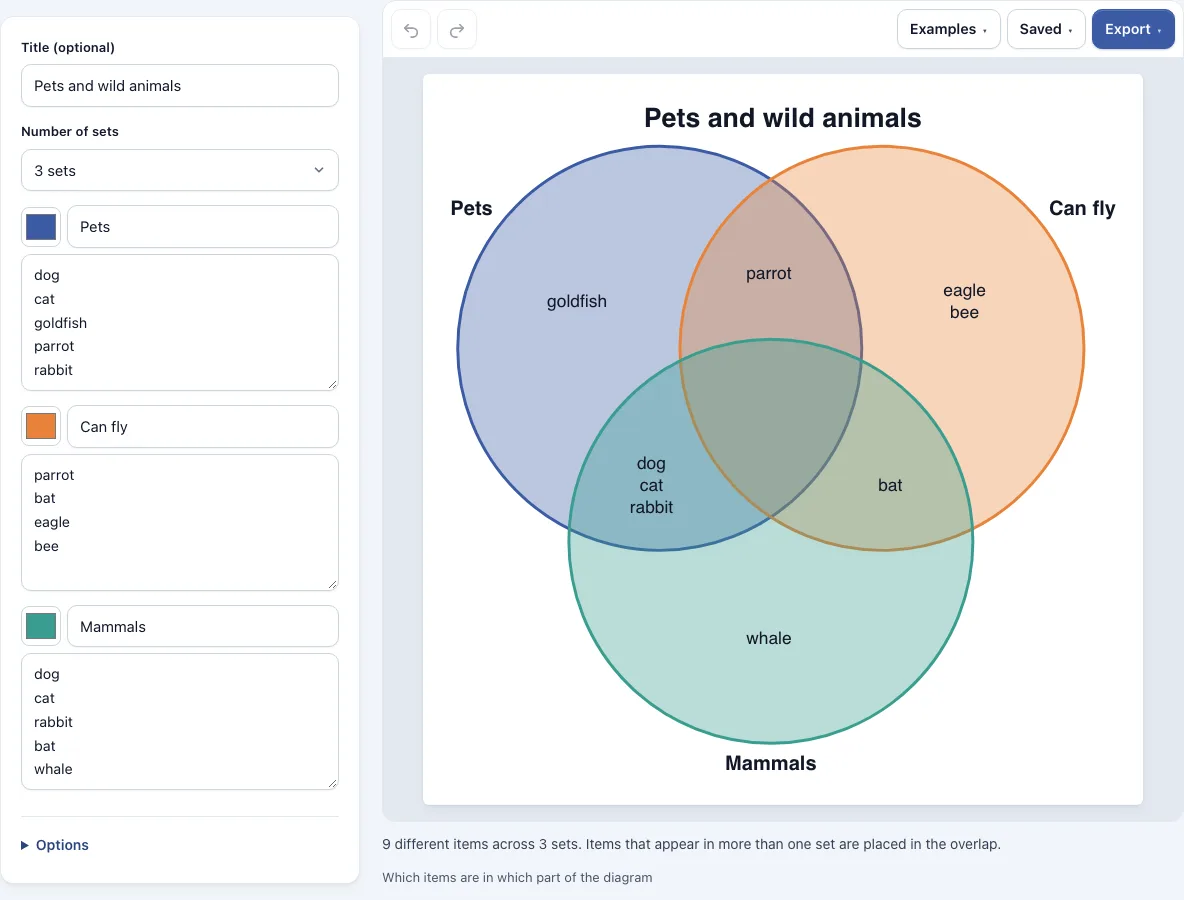
How to use the Venn diagram maker
- Open the editor. It loads a sample diagram. To try a different example, open the Examples menu and choose Pets and wild animals (3 sets), Two clubs (2 sets) or Numbers 1 to 12 (4 sets).
- Choose the number of sets in the ‘Number of sets’ menu: 2, 3, 4 or 5.
- Type a title in the Title box.
- For each set, pick a color with the color picker and type a name in the name box.
- In each set’s text box, type the items, one per line. If you type the same item in more than one set, it is placed in the overlap automatically.
- Check the diagram and the table under it, which lists every part with its items.
- Open Options to choose what appears in the diagram (The items, Only the counts or Nothing), whether the circles are Equal circles or Sized by number of items, and how strong the colors are with the Color strength slider.
- Open the Export menu and choose a PNG image, PNG 2x, PNG 4x (print quality), SVG (vector), PDF or Copy image to clipboard.
Undo and Redo buttons are in the toolbar, so you can step back after a change. Use the Saved menu to save named copies of your work or to copy a link to the diagram.
What is a Venn diagram?
A Venn diagram is a drawing that uses overlapping circles to show what different sets have in common. Each circle stands for one set, and an item in the overlap belongs to every set whose circle covers it. An item inside only one circle belongs to that set alone.
The English logician John Venn described these diagrams in 1880, and they are named after him. The overlap of two sets is called their intersection. Everything that is in at least one of the sets is their union. For example, if one set holds cat, dog and rabbit and another holds dog and horse, then dog is the intersection, and cat, dog, rabbit and horse together form the union.
How to read a Venn diagram
To read a Venn diagram, first find the circle for each set and read its name. Then look in the part where the circles overlap to find what the sets share. Each item there belongs to all of those sets at once.
To find what only one set has, look in the part of that circle outside the overlap. Items in that region belong to that set and to no other set in the diagram. If a diagram has the sets Pets and Mammals, an item in their overlap is both a pet and a mammal, and an item only inside the Pets circle is a pet that is not a mammal. Items outside every circle belong to none of the sets shown.
How many sets can a Venn diagram show?
Two and three sets fit neatly in circles, and those are the diagrams most people draw. With four or five sets, circles can no longer show every possible overlap, so this tool draws the sets as ellipses instead. For two and three sets you can also choose Sized by number of items, which makes a bigger set a bigger circle.
Frequently asked questions
Can I make a blank Venn diagram?
Yes. Open the Saved menu and choose Start new to get an empty diagram. Then choose the number of sets, name each set and type your own items.
How many sets can a Venn diagram have?
This tool supports 2 to 5 sets. Two and three sets are drawn as circles. Four and five sets are drawn as ellipses, because circles cannot make all the overlapping parts for four or more sets. Every possible part is present, which is 15 parts for four sets and 31 for five.
Can the circles be sized by the number of items?
Yes, for 2 or 3 sets. Choose Sized by number of items under Circle size in Options. The area of each circle then follows the number of items in that set, and each overlap follows the number of shared items. With three circles, the triple overlap is approximate, but the numbers shown are always exact.
How are items placed in the overlap?
Items are placed automatically. Type an item in more than one set and it goes into the overlap of those sets, so you never have to choose the part yourself. Blank lines and repeated items are ignored. Upper and lower case count as the same item unless you tick ‘Treat upper and lower case as different items’ in Options. If a part holds more items than fit, the last line shows how many more there are, such as +4 more, and the table under the diagram lists them all.
Can I export a Venn diagram as PNG, SVG or PDF?
Yes. The Export menu offers PNG image, PNG 2x, PNG 4x (print quality), SVG (vector), PDF and Copy image to clipboard. Files are cropped to the diagram, have a white background and carry no watermark.
Is my diagram uploaded to a server?
No. Nothing you type is uploaded. The latest work stays in your browser automatically. A link copied from the Saved menu contains the whole diagram inside the link itself, not on a server.
Can I use my Venn diagrams commercially?
Yes. Venn diagrams you make here are yours to use for personal, school and commercial work, including reports, slides, books and printables you sell. No credit is required. The only thing you may not do is copy the tool or the site itself to run a competing service; see the terms.
Related tools
- 3 circle Venn diagram: use it when you want a diagram focused on three overlapping sets.
- Venn diagrams, concept maps and tree diagrams: browse all the tools in this group.
- Concept map maker: use it when you need to connect ideas with labelled links.
- Tree diagram maker: use it when your information branches out from one starting point.
- All Diagram Smith tools: see every tool on the site.