UML Class Diagram Maker
Type your classes and relationships as plain text and the UML class diagram is drawn as you type; download it as PNG, SVG or PDF.
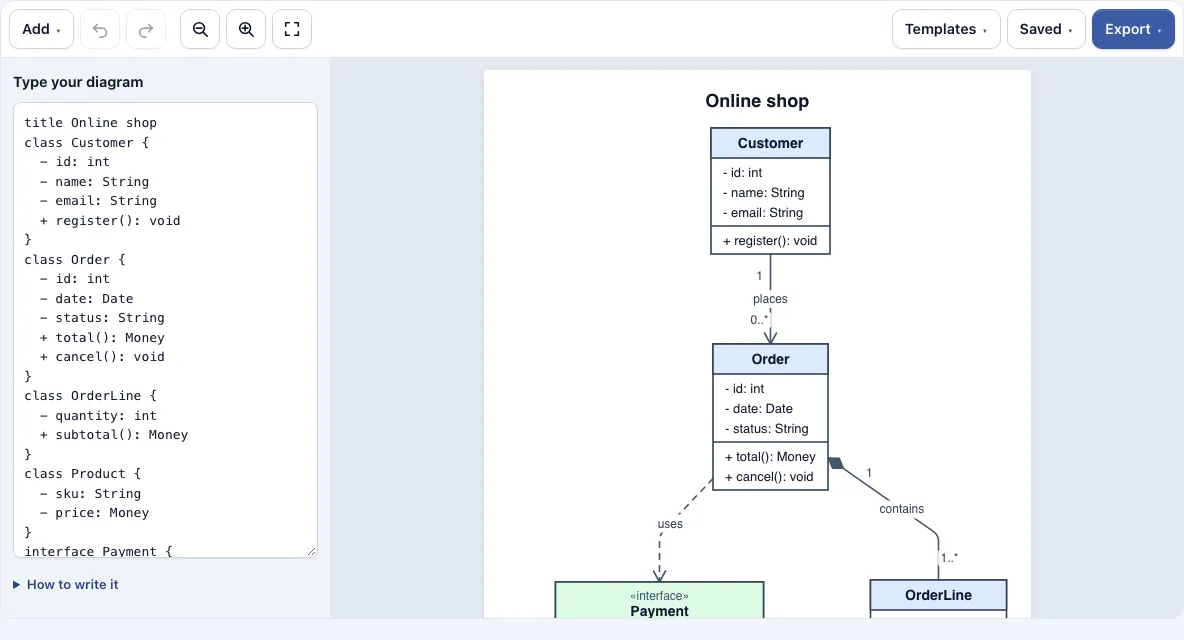
How to use the UML class diagram maker
- Open the Templates menu and load “Online shop” to see a working example. To start from scratch, open the Saved menu and choose the option that starts a new empty diagram.
- Type a class in the text box on the left, for example
class Order { - id: int; + total(): Money }. You can also write one member per line between braces. - Connect classes by writing their names with a relationship between them, for example
Customer "1" --> "0..*" Order : places. - Watch the drawing on the right update. If a line is not understood, it is listed under the text box with its line number, so fix that line and it will be drawn.
- If you prefer not to type the syntax, use the Add menu to insert a class, interface, enum, inheritance, composition or association with multiplicity.
- Add a title with
title My diagram, or writedirection LRto lay the diagram out left to right instead of top to bottom. - Use the zoom buttons or Fit to screen to change the size of the drawing. On a phone, the drawing appears above the text box.
- Open the Export menu and choose PNG, PNG 2x, PNG 4x, SVG or PDF, or use Copy image to clipboard.
Undo and Redo are in the toolbar, or press Ctrl+Z and Ctrl+Shift+Z. Your latest work is saved automatically in this browser. The Saved menu keeps named copies and can copy a link that contains the whole diagram.
What is a UML class diagram?
A UML class diagram shows the classes in a software system, the attributes and methods each class has, and how the classes relate to each other. UML stands for Unified Modeling Language, and the class diagram is the most common UML diagram for showing the structure of code.
Each class is drawn as a box with three parts: the name at the top, the attributes (data) in the middle, and the methods (actions) at the bottom. Interfaces and enumerations carry a stereotype line above the name, and abstract classes have their names in italics. The name box is tinted by kind, so you can tell a class, abstract class, interface and enumeration apart at a glance.
What do the arrows and symbols in a class diagram mean?
Each line between two classes shows a relationship, and the shape of its end tells you what kind it is. The main kinds are inheritance, composition, aggregation and association.
- Inheritance (
Child --|> Parent) has a hollow triangle at the parent. The child is a kind of parent. - Realization (
..|>) has a dashed line and a hollow triangle. A class implements an interface. - Composition (
*--) has a filled diamond at the whole. The parts belong to the whole and do not exist without it. - Aggregation (
o--) has a hollow diamond at the whole. The parts can exist on their own. - Association (
-->or--) is a plain link between two classes. An arrow shows its direction. - Dependency (
..>) is a dashed line with an open arrow. One class uses another briefly, for example as a parameter.
Parents are placed above their children automatically, so the inheritance lines run downward.
How do you read a UML class diagram?
Start with the class names to see which things the system has, then follow the lines. For each line, read the symbol at its end: a hollow triangle means “is a kind of”, a diamond means “is made of” or “has”, and an open arrow means “uses”. Numbers near the ends of a line, such as 1 and 0..*, say how many objects take part on that side. The attributes show what a class stores and the methods show what it can do.
Frequently asked questions
Is a UML class diagram the same as a class diagram?
In everyday use, yes. “Class diagram” is the common name, and the UML class diagram is the standard notation for drawing one. This tool draws class diagrams in UML style.
What do +, -, # and ~ mean in a class diagram?
They are visibility signs placed before a member. + means public, - means private, # means protected, and ~ means package. A member with brackets is a method and is placed in the lower part of the box. {static} underlines a member and {abstract} writes it in italics.
What do multiplicities like 1 and 0..* mean?
A multiplicity is written in quotes next to a class, showing how many objects of that class take part in the relationship. “1” means exactly one, “0..” means zero or many, and “1..” means one or more. In Customer "1" --> "0..*" Order : places, each customer places zero or more orders, and each order belongs to exactly one customer.
Can I export a class diagram as PNG, SVG or PDF?
Yes. Open the Export menu and choose PNG, PNG 2x, PNG 4x, SVG or PDF. The files have a white background and no watermark, and they always contain the whole diagram, even if you have zoomed in on the page.
Is the UML class diagram maker free, and is my diagram uploaded?
It is free and needs no account. It runs in your browser, and the diagram is not uploaded to a server. Your latest work is saved in that browser only.
Why is a line from my text listed under the text box?
The tool could not read that line, so it lists it with its line number and skips it. Check the spelling of the class names and the relationship syntax on that line. A class also cannot be connected to itself.
Can I use what I make with the uml class diagram maker commercially?
Yes. Everything you make here is royalty-free for personal, classroom and commercial use, including documentation, books and course material. No credit is required. The only thing you may not do is copy the tool or the site itself to run a competing service; see the terms.
Related tools
- Software and network diagrams: see all the diagram tools in this group when you need a different kind of diagram.
- ER diagram maker: use this to draw entities and relationships for a database design.
- Sequence diagram maker: use this to show the order of messages between objects over time.
- Network diagram maker: use this to draw servers, devices and the connections between them.
- Flowchart maker: use this to map steps, decisions and processes.