Tree Diagram Maker
Type your tree as an indented outline or draw it with boxes and branches, then download it as PNG, SVG or PDF.
The tree diagram maker is a free tool for drawing tree diagrams in your web browser. A tree diagram starts from one item at the root and splits into branches, and each branch can split again. This tree diagram generator builds that structure from boxes, connections and branch labels. There is no account or sign-up, and the diagram is not uploaded anywhere.
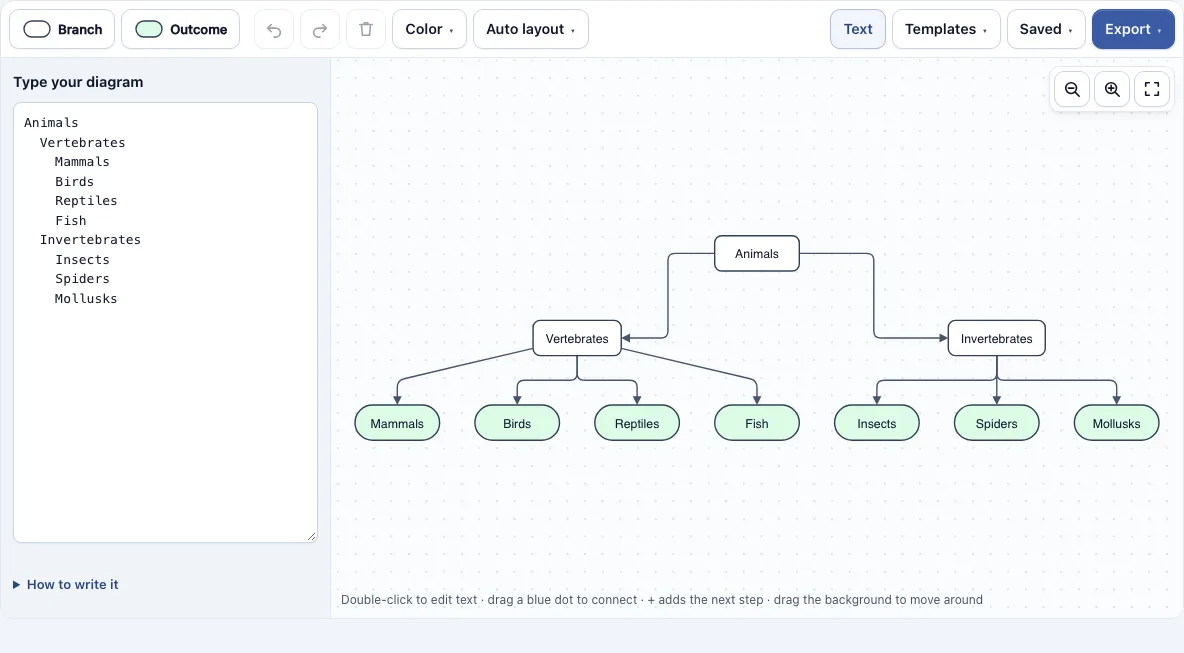
You can use it to show how something divides into parts, to list every outcome of a series of choices, or to work out probabilities. The editor opens with a sample tree that classifies animals, so you can change it instead of starting from a blank page. If you already have the structure written down, you can type it as an indented outline and the diagram is drawn for you. Use this tree chart maker to build a clear tree diagram in a few minutes.
How to use the tree diagram maker
- Open the editor. It loads with a sample tree that classifies animals. To start from a different layout, open the Templates menu and choose Two coin flips, Classifying animals, Marbles from a bag, Factor tree of 60 or Choices.
- Double-click a box to edit its text. Press Enter to save, Shift+Enter for a line break, or Esc to cancel.
- Double-click empty space to add a new item there. To add a connected box, select a box and click one of the four + buttons on its sides.
- Connect two boxes by dragging one of the small blue dots at the edge of a box onto another box. Drop the dot on empty space to create a new connected box.
- Click Text to open the outline box. Type one item per line and indent child items with two spaces or a tab. To label a branch, add a bar and the label after the item, such as
Heads | 1/2. - Open the Auto layout menu and choose top to bottom or left to right. The tree is arranged and the lines are routed for you.
- Drag boxes to move them. They snap to a 10-pixel grid, and holding Alt allows free movement. Use Ctrl/Cmd plus the mouse wheel to zoom, or use the zoom and Fit buttons in the toolbar.
Delete removes the selection and Ctrl+Z undoes. Your work is saved automatically in this browser, and the Saved menu keeps named copies and copies a share link.
What is a tree diagram?
A tree diagram is a diagram that starts from one item at the root and splits into branches, and each branch can split again. It shows how something divides into parts, lists all possible outcomes of a sequence of choices or events, and helps you work out probabilities.
A classification tree, such as the sample animals tree, starts with a broad group at the top and splits it into smaller groups until each item sits at the end of a branch. For a sequence of choices, each path from the root to the end of a branch is one complete outcome. If you choose a lunch with soup, salad or sandwich and then a drink, every combination is one path. Counting the ends of the branches gives you the number of outcomes, which is why the Choices template is useful for counting.
How do you calculate probabilities on a tree diagram?
A probability tree is a tree diagram where each branch is labelled with the chance of that outcome. Chances can be written as fractions (1/2), decimals (0.5) or percentages (50%). The probabilities of the branches leaving any one point must add up to 1, because one of those outcomes has to happen.
To draw one, start by drawing a branch for each possible outcome of the first event and write its probability on it. From the end of each branch, draw the outcomes of the next event with their probabilities, and repeat for any further events. To find the probability of a whole sequence, multiply the probabilities along its path. To find the probability of an outcome that can happen in more than one way, add the results of the paths that give that outcome.
For example, a bag holds 3 red and 2 blue marbles, and you draw two without replacement. The first draw gives red 3/5 and blue 2/5. If the first marble is red, the second draw gives red 2/4 and blue 2/4. The path red then red is 3/5 × 2/4 = 3/10. Red then blue is also 3/10, blue then red is 2/5 × 3/4 = 3/10, and blue then blue is 2/5 × 1/4 = 1/10. These four results add up to 1. The probability of at least one red is the sum of the three paths that include red, which is 9/10.
The tool can check this for you. When the branch labels are probabilities, a table under the diagram lists every path from the first item to the end of a branch, with its probability and the total of all paths.
Frequently asked questions
What is a factor tree?
A factor tree splits a number into two factors, then splits each factor again, until only prime numbers are left at the ends of the branches. For 60, one tree gives 60 = 6 × 10, then 6 = 2 × 3 and 10 = 2 × 5. So 60 = 2 × 2 × 3 × 5.
Can I make a tree diagram from text?
Yes. Click Text and type an indented outline with one item per line. A line indented under another line becomes its child, using two spaces or a tab per level, and a leading - or * is ignored. Several top-level lines make several separate trees. The diagram redraws as you type, and any changes you make in the drawing update the text.
Can I export a tree diagram as PNG, SVG or PDF?
Yes. The Export menu offers a PNG image, a PNG at 2x, a PNG at 4x (print quality), an SVG (vector) file and a PDF. You can also copy the image to the clipboard. Files are cropped to the diagram, have a white background and carry no watermark. Choose the 4x PNG or the SVG if you need a sharp image for print.
What does the warning about branches not adding up to 1 mean?
When the branch labels are probabilities, the tool checks the branches leaving each item. If they do not add up to 1, a warning appears. This usually means one label is mistyped or a branch is missing. Check that the branches from each point cover every possible outcome.
Which template should I start with?
Choose Two coin flips for a simple probability tree, or Marbles from a bag for probabilities without replacement. Choices suits counting outcomes, Factor tree of 60 suits prime factors, and Classifying animals suits sorting items into groups. Each template is fully editable, so you can use it as a starting point.
Can I use my tree diagrams commercially?
Yes. Tree diagrams you make here are yours to use for personal, school and commercial work, including reports, slides, books and printables you sell. No credit is required. The only thing you may not do is copy the tool or the site itself to run a competing service; see the terms.
Related tools
- Concept map maker: use it when you need to show how ideas link to each other in a web rather than a single branching path.
- Venn diagram maker: use it to compare overlapping sets and show what they have in common.
- Venn diagrams, concept maps and tree diagrams: see all the tools in this group in one place.
- Flowchart maker: use it for step-by-step processes with decisions and loops.
- All Diagram Smith tools: browse the full set of free diagram tools.