Swimlane Diagram Maker
Put every step in the lane of whoever does it, drag steps between lanes and see the hand-offs counted. Export PNG, SVG or PDF, free and without sign-up.
Free · runs in your browser · nothing is uploaded
How to use the Swimlane Diagram Maker
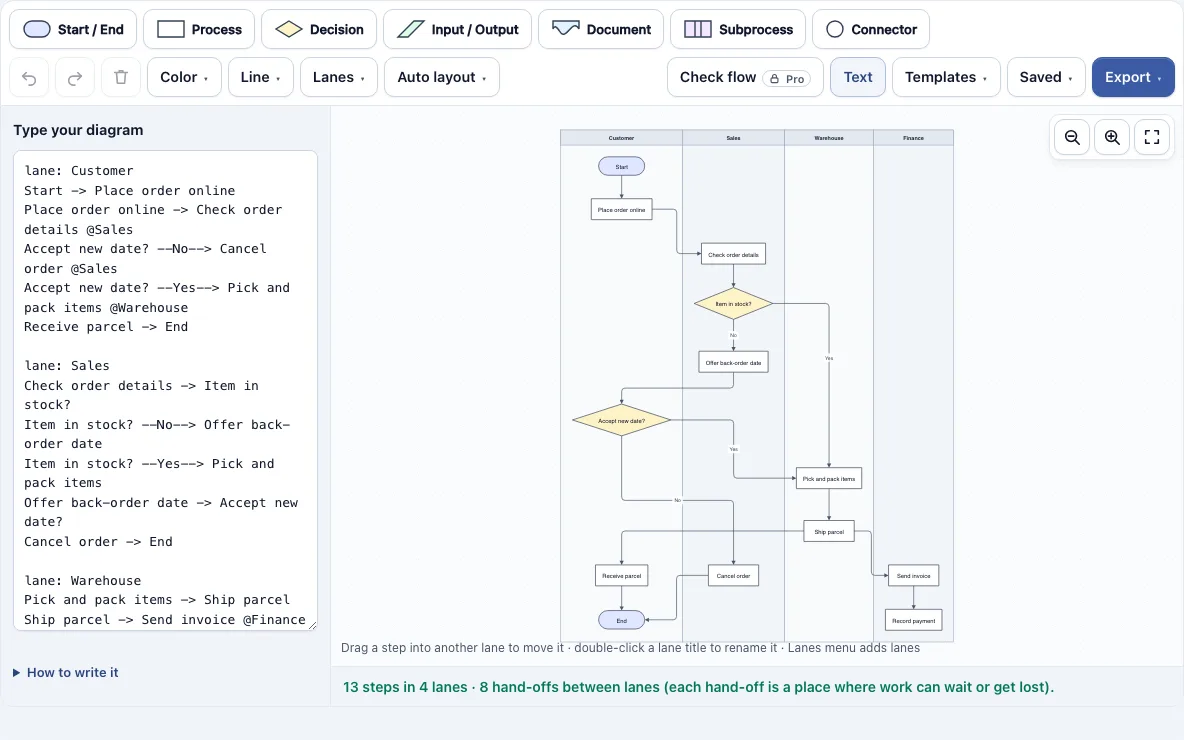
- Open the page. The Order to delivery template loads with four lanes: Customer, Sales, Warehouse and Finance. To start a different diagram, open the Templates menu and choose one of the eight swimlane templates.
- Double-click a lane title to rename it. A single click selects the lane, which decides what the Lanes menu acts on.
- Open the Lanes menu and choose Add a lane. Type a name when it asks for one.
- Pick a shape from the toolbar: Start / End, Process, Decision, Input / Output, Document, Subprocess or Connector.
- Double-click a shape to type its text. Press Enter to save, or Shift+Enter for a line break.
- Connect shapes by dragging one of the small blue dots on a shape’s edge onto another shape. You can also use the + buttons around a selected shape to add the next connected shape.
- Drag each step into the lane of whoever does it. Lanes grow to fit their steps.
- Read the counts below the drawing and fix any warnings before you export.
Ctrl+Z and Ctrl+Shift+Z undo and redo, Ctrl+C and Ctrl+V copy and paste steps, and Tidy up in the Auto layout menu rearranges the drawing. The Saved menu keeps named copies and can copy a share link that contains the diagram. Export from the Export menu as PNG, SVG or PDF.
What is a swimlane diagram?
A swimlane diagram is a flowchart split into horizontal or vertical bands called lanes. Each lane belongs to one person, role, team or system, and every step is placed in the lane of whoever performs it. Arrows that cross from one lane to another are hand-offs, the points where work moves from one owner to the next. The layout shows at a glance who does what and where the process changes hands.
How many hand-offs does my process have?
The tool counts them for you. Below the drawing it lists the steps, the lanes and the hand-offs, the connectors that cross from one lane into another. For the Order to delivery template it shows “13 steps in 4 lanes · 8 hand-offs between lanes”. Each hand-off is a place where work can wait or get lost.
Moving a step to another lane, or removing a lane, updates the count at once, so you can compare two versions of a process and keep the one with fewer hand-offs. The same panel flags problems:
| Check | What it means |
|---|---|
| Empty lane | A lane has no steps in it |
| Unnamed lane | A lane has no title yet |
| Unconnected step | A step has no arrows; it is outlined in red |
| Check flow (Pro) | Outlines unlabelled decision branches, dead ends, loose shapes and a missing start or end in red |
What is the difference between a flowchart and a swim lane?
A flowchart shows the order of steps and decisions in a process. A swimlane diagram is a flowchart with lanes added, so it also shows who or what carries out each step. The steps and arrows work the same way in both. The lanes are the extra layer that exposes responsibility and hand-offs.
You can also write the diagram as text. Start a lane with a line such as lane: Sales, and every step written after it belongs to that lane. Put @Warehouse after a step to move it to another lane, as in Pack order -> Ship order @Warehouse. Lines that follow each other are joined by an arrow, even across lanes. The drawing updates as you type, and the text updates when you edit the drawing.
Frequently asked questions
What is the correct order of the swim lanes?
There is no fixed rule. A common habit is to put the lane that starts the process, often the customer, at the top or left, then order the other lanes by when the work reaches them. This keeps arrows short. Use Move lane back and Move lane forward in the Lanes menu to reorder them.
Can I draw the lanes as rows instead of columns?
Yes. Open the Lanes menu and choose Show lanes as rows, or Show lanes as columns to switch back. In the text panel, add the line lanes horizontal to draw the lanes as rows. The Hiring process and Invoice payment templates already use rows.
Can I open it in draw.io?
Yes, with Pro. The Export menu includes a .drawio file that opens in diagrams.net (draw.io) with real, editable shapes. Each lane is a draw.io swimlane container and each step sits inside its lane, so moving a lane in diagrams.net also moves its steps. Free exports are PNG, SVG and PDF, and none carry a watermark.
Is the Swimlane Diagram Maker free?
Yes. The tool is free and needs no account. Your diagram is not uploaded, and the latest version is saved automatically in your browser. The Saved menu keeps named copies, and it can copy a share link that contains the diagram.
Can I use what I make with the swimlane diagram maker commercially?
Yes. Swimlane diagrams you draw here are yours for personal, school and commercial work, such as process documents, audits, training slides and client handbooks. No credit is required. The only thing you may not do is copy the tool or the site itself to run a competing service; see the terms.
Can I move a step from one lane to another?
Yes. Drag the step into the other lane, and it moves there. Lanes grow automatically so the step fits. If you type the diagram as text, add @ and the lane name after the step instead.
Related tools
- Flowchart Maker: Use it when your process has no owners to show and you only need the steps and decisions.
- Flowchart Templates: Use it to start from a ready-made flowchart instead of a blank page.
- Activity Diagram Maker: Use it to model the actions and flow of a single process in a UML style.
- Data Flow Diagram Maker: Use it to show how data moves between processes, stores and external parties.
- RACI Matrix Maker: Use it to assign who is Responsible, Accountable, Consulted and Informed for each task.
- Decision Tree Maker: Use it to map out choices and their outcomes as a branching tree.
- Org Chart Maker: Use it to show reporting lines between people and teams.