State Diagram Maker
Draw states and labelled transitions, and watch the state transition table and the checks update as you edit. Export PNG, SVG or PDF, free and without sign-up.
Free · runs in your browser · nothing is uploaded
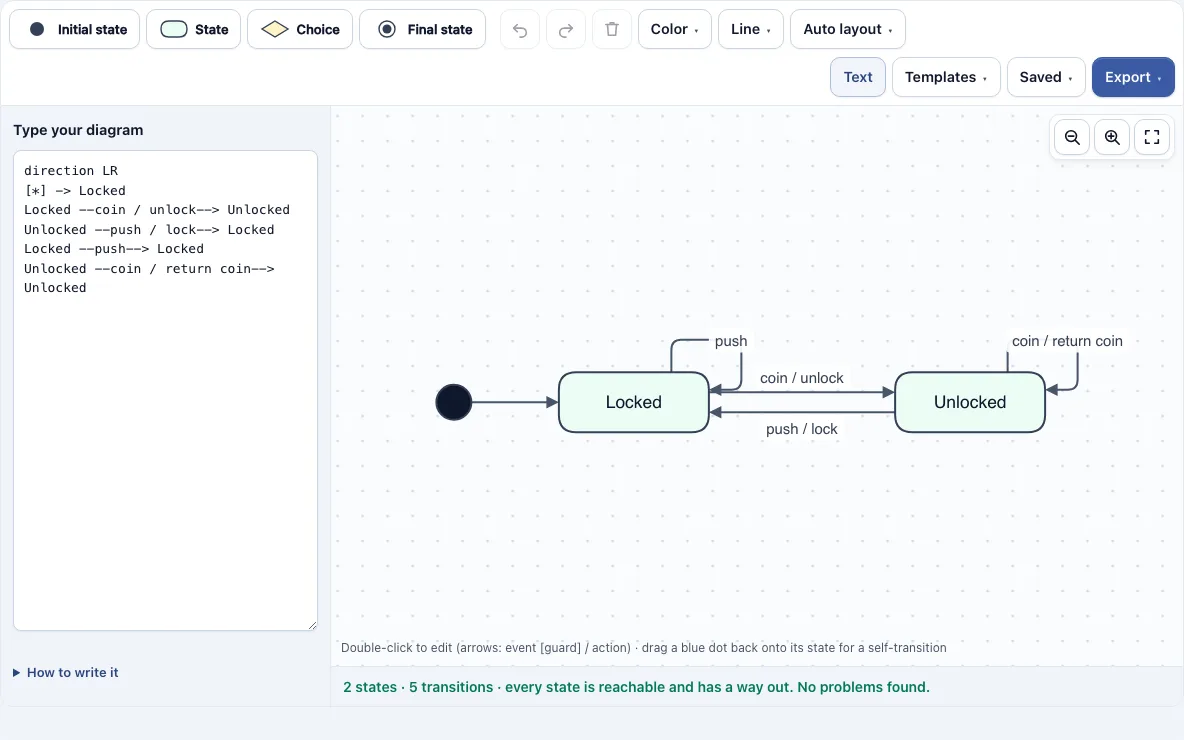
The State Diagram Maker is a free tool that runs in your web browser for drawing state diagrams, also called state machine diagrams. You build the diagram from toolbar shapes, label the arrows with events, guards and actions, and watch a state transition table update as you work. No account is needed.
Your diagram is not uploaded. The latest version saves automatically in this browser, so you can return to it later. You can start from one of eight templates, such as the Coin turnstile, Order lifecycle or Vending machine, or draw from scratch. Live checks outline problem shapes in red, so you can catch a missing start state or an unreachable state before you export.
How to use the State Diagram Maker
- Open the tool and choose a template, or keep the default Coin turnstile.
- Add shapes from the toolbar: Initial state (black dot), State (rounded box), Choice (small diamond) and Final state (black dot in a circle).
- Connect two shapes by dragging one of the small blue dots on a shape’s edge onto the other shape. You can also select a shape and press the + buttons around it to add the next connected shape.
- Double-click a shape or arrow to edit its text. Press Enter to save, or Shift+Enter for a line break.
- Label each arrow as
event [guard] / action, for examplecoin [credit >= price] / unlock. - Add activity lines under a state name, such as
entry / start timer. A line separates the name from the activities. - Check the red outlines and the state transition table under the editor, and fix any flagged shape.
- Open the Export menu to save a PNG image, a PNG at 2x or 4x resolution, an SVG, a PDF, or copy the image to the clipboard.
Ctrl+Z and Ctrl+Shift+Z undo and redo, Ctrl+C and Ctrl+V copy and paste states, and the Auto layout menu re-arranges the diagram top to bottom or left to right. The Saved menu keeps named copies and can copy a share link that contains the diagram.
What is a state diagram?
A state diagram is a drawing of the states an object or system can be in and the events that move it from one state to another. Each state is a condition that lasts for a while, such as Locked or Unlocked, and each arrow between states is a transition triggered by an event.
Each state is a rounded box. The initial state (black dot) marks where the machine starts, and a final state (black dot in a circle) marks where it ends. A transition reads event [guard] / action. The event triggers it, the guard in square brackets must be true, and the action runs during the transition. A transition dragged from a state back onto itself is a self-transition, drawn as a loop. In the turnstile, Locked --push--> Locked means a push while locked keeps the turnstile locked.
What is a state transition table?
A state transition table lists every state in rows and every event in columns. Each cell shows the state the machine moves to, or a dash when that event is ignored in that state. It holds the same information as the diagram, in grid form.
For the Coin turnstile, the table reads:
| State | coin | push |
|---|---|---|
| Locked | Unlocked | Locked |
| Unlocked | Unlocked | Locked |
The tool generates this table live from your diagram below the editor, and Download table (CSV) saves it. Alongside it, the live checks flag states that cannot be reached from the initial state, states with no way out, and two transitions with the same event and no guard out of one state, because the machine cannot decide which to take.
State diagram or flowchart?
A state diagram shows the conditions a system can be in and the events that change them. A flowchart shows the steps of a process. In a state diagram the boxes are conditions that last, such as Locked. In a flowchart they are actions, such as Insert coin.
Both use boxes and arrows, so they look alike. Use a flowchart when you need the order of steps. Use a state diagram when you need to know which condition the thing is in at any moment and which events it responds to.
Frequently asked questions
What do the symbols mean?
A black dot is the initial state, where the machine starts. A rounded box is a state, and a small diamond is a choice point that branches on a guard. A black dot inside a circle is a final state. Arrows are transitions labelled event [guard] / action.
Can I write it as text like Mermaid or PlantUML?
Yes, in a similar style. The text panel reads lines such as [*] -> Idle, Idle --coin--> Unlocked and Done -> [*], close to PlantUML’s state diagrams. It is its own small syntax, though: the event goes inside the arrow rather than after a colon, and composite states and notes are not read, so adjust code pasted from Mermaid or PlantUML.
Is my diagram uploaded anywhere?
No. The diagram is not uploaded. The latest version saves automatically in your browser, and the Saved menu keeps named copies. A share link from the Saved menu contains the diagram itself.
Do free exports have a watermark?
No. PNG, SVG and PDF exports from the free version carry no watermark. Pro adds a Vector PDF with sharp, selectable text and a .drawio file that opens in diagrams.net (draw.io) with editable shapes.
Can I use my state diagrams commercially?
Yes. Diagrams you make here are yours to use for personal, school and commercial work, including specifications, course material and client projects. No credit is required. The only thing you may not do is copy the tool or the site itself to run a competing service; see the terms.
What does a guard do?
A guard is a condition in square brackets, such as [credit >= price], that must be true for the transition to fire. If several transitions share an event, guards tell the machine which one to take. The live checks flag a choice that has fewer than two exits or an exit without a guard.
Related tools
- Activity Diagram Maker: use it to show the workflow steps and decisions of a process, rather than the states of one object.
- Use Case Diagram Maker: use it to show what actors can do with a system at a high level.
- Sequence Diagram Maker: use it to show the messages exchanged between objects over time.
- UML Class Diagram Maker: use it to model classes, their attributes and the relationships between them.
- Flowchart Maker: use it when you need a step-by-step process with actions rather than conditions.
- Block Diagram Maker: use it to show the main parts of a system and how they connect.
- Decision Tree Maker: use it to map choices and their outcomes as a branching tree.