Sequence Diagram Maker
Type your messages as plain text and the UML sequence diagram is drawn as you type; download it as PNG, SVG or PDF.
How to use the Sequence diagram maker
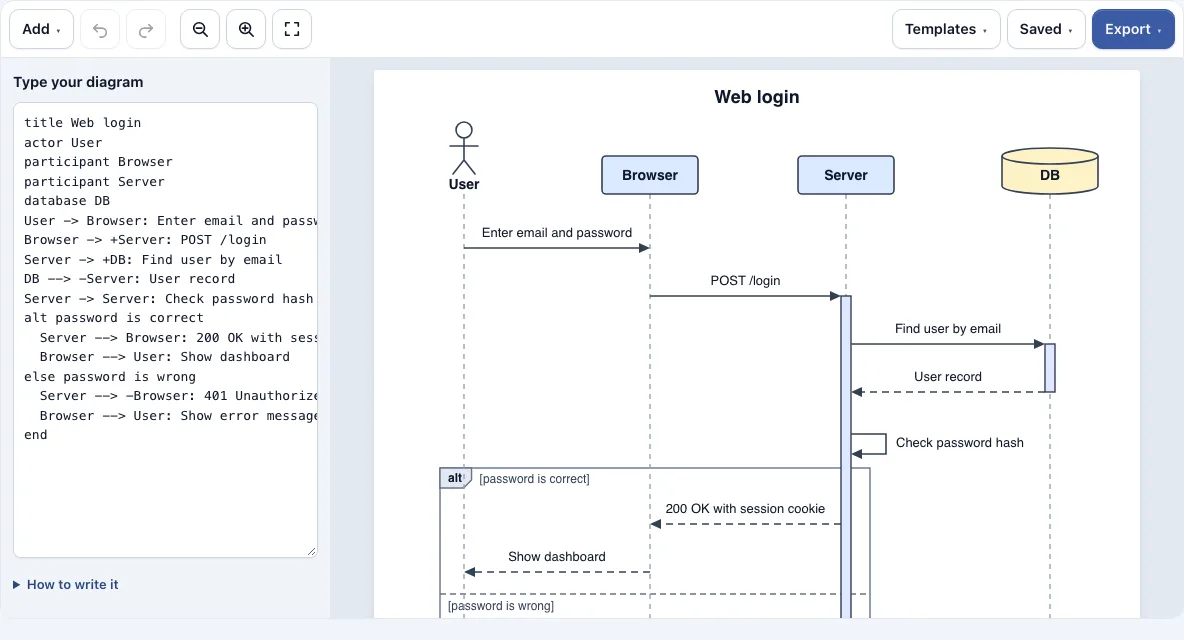
- Open the page. The web login example is already in the text box on the left. Read it to see how the lines map to the drawing.
- To start from a different example, open the Templates menu and load Online checkout or API request with retry.
- Edit the lines in the text box, or clear them and start again. Write one message per line, such as
Alice -> Bob: Hello. - To set the kind or order of a participant, declare it first:
actor Alice,database Orders, orparticipant "Payment service" as Pay. - Check the diagram on the right as you type. If a line appears under the text box with a line number, it is not understood and is skipped until you correct it.
- If you are unsure of the syntax, use the Add menu. It inserts a participant, actor, message, reply, message to itself, note, alt/else group or loop group.
- When the diagram is right, choose a file format from the Export menu.
Use Ctrl+Z and Ctrl+Shift+Z, or the Undo and Redo buttons in the toolbar, to step back and forward through your edits. The Saved menu keeps named copies of your diagram, copies a link that holds the whole diagram, and starts a new empty diagram.
What is a UML sequence diagram?
A UML sequence diagram shows how parts of a system exchange messages, with time running from top to bottom. Each participant is drawn as a column, with a dashed lifeline running down from it, and each message is a horizontal arrow from one lifeline to another. UML (Unified Modeling Language) is a standard set of diagram types, and this one is best for showing the order of steps in a single scenario.
How do I make a sequence diagram?
Start by listing the participants, such as a user, a web app and a database. Then write the messages in the order they happen, from sender to receiver, and read the result from top to bottom. The first message is the first thing that happens. Add replies, notes and groups only after the main path is correct, because they are easier to place once the order is fixed.
What do the arrows in a sequence diagram mean?
Each arrow shows two things: whether the line is solid or dashed, and what the arrowhead looks like. A solid line usually marks a request, and a dashed line usually marks a return. A filled head is conventionally a synchronous call, where the sender waits for an answer, and an open head is conventionally an asynchronous message, where it does not. In this tool:
->solid line, filled head: a request-->dashed line, filled head: usually a reply->>solid line, open head-->>dashed line, open head<-points the other way roundA -> A: textis a message to itself, drawn as a loop
How do I show activation bars, loops and alt/else in a sequence diagram?
An activation bar is a thin rectangle on a lifeline that shows when a participant is busy handling a message. Start one with A -> +B: call and end it with B --> -A: done. The minus sign ends the bar of the sender. You can also use activate B and deactivate B on their own lines. Nested activations on the same participant are drawn shifted.
Groups wrap a part of the diagram in a labelled frame, and each one must be closed with end. Use loop for steps that repeat. Use alt for a choice, with else for the other branch. Use opt for a step that may or may not happen. Use par with and for steps that run at the same time. Groups can be nested.
Frequently asked questions
Can I export a sequence diagram as PNG, SVG or PDF?
Yes. The Export menu offers PNG, PNG 2x, PNG 4x, SVG and PDF, and it can also copy the image to the clipboard. The files have a white background and no watermark.
Is my diagram uploaded to a server?
No. Everything runs in your web browser, and the diagram is not uploaded. The link copied from the Saved menu contains the whole diagram inside the link itself, not on a server.
Why is one of my lines not showing?
The tool lists any line it does not understand under the text box, with its line number, and skips it. Correct the syntax on that line, and the diagram will include it.
How many participants can a diagram have?
A diagram can have at most 12 participants. If your scenario needs more, split it into two diagrams, each covering one part of the process.
Can I use the tool on a phone?
Yes. On a phone the drawing is shown above the text box. Use the zoom buttons to see the details.
Can I use what I make with the sequence diagram maker commercially?
Yes. Everything you make here is royalty-free for personal, classroom and commercial use, including documentation, books and course material. No credit is required. The only thing you may not do is copy the tool or the site itself to run a competing service; see the terms.
Related tools
- Network diagram maker: use it to draw the servers, routers and links of a system rather than the order of messages.
- UML class diagram maker: use it to model the classes, their fields and the relationships between them.
- ER diagram maker: use it to plan database tables and how they relate to each other.
- Software and network diagrams: use it to see all the tools in this group in one place.
- Flowchart maker: use it when you need to show decisions and the steps of a process, not messages between parts.
- All Diagram Smith tools: use it to browse every tool on the site.