Sankey Diagram Generator
Write one flow per line, or paste rows from a spreadsheet. The Sankey diagram draws as you type and you can drag the nodes into order.
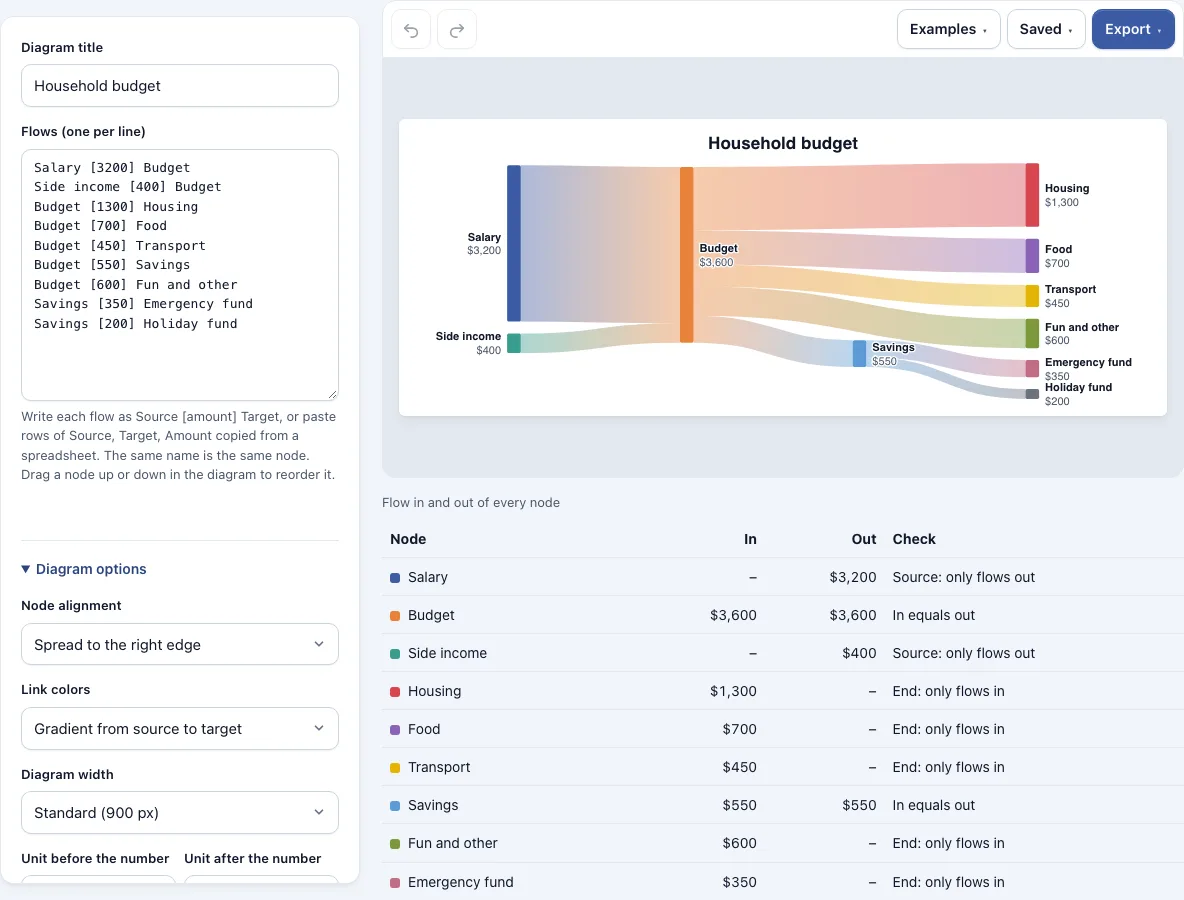
How to use the Sankey diagram generator
- Open the page. The example household budget is already loaded. To start fresh, choose Start a new, empty one in the Saved menu, or pick another example from the Examples menu.
- Enter one flow per line in the form
Source [amount] Target, for exampleSalary [3200] Budget. You can also paste rows ofSource, Target, Amountcopied from a spreadsheet. Commas, semicolons and tabs all work, and a header row is skipped. - Look at the diagram. Each flow is a band, and a wider band means a bigger amount.
- Check for skipped lines. The tool reports any line it cannot read, any amount that is not above 0, and any line that starts and ends at the same node, with its line number.
- Read the table under the diagram. Each node shows the flow in, the flow out and a check.
- Drag a node up or down to change its order. The bands follow. Click Reset node positions to put them back.
- Adjust the look with Node alignment, Link colors, Diagram width, the units before and after the number, Space between nodes, and Show the amounts next to the names.
- Open the Export menu for PNG, PNG at 2x or 4x, SVG or PDF, or to copy the image.
To share a diagram, use Copy link to this diagram in the Saved menu; the whole diagram is stored in the link after the # sign, so it is not sent to any server.
What is a sankey diagram?
A Sankey diagram is a chart that shows how a quantity splits and flows from one stage to another. It is made of bands, called flows, that connect nodes, which are the named points such as “Salary” or “Rent”. Sankey diagrams are used for money, energy, materials, and website visitors, and they make the largest flows easy to spot at a glance.
Each flow is drawn as a band whose width is proportional to its amount. Each node is drawn as a bar whose height is the larger of two totals: the flow coming in or the flow going out. The diagram flows one way, so a flow always moves from a source on the left toward a target on the right. Because of this rule, the flows cannot loop back on themselves.
Two lines with the same source and target are added together, so you can list a flow in pieces. A name used in several lines is one node, which is how a flow arriving in one line continues in the next: in the household budget, Budget receives money from Salary and Side income and passes it on to Housing, Food and the other categories.
How to read a sankey diagram
Start at the left edge and follow the widest band first. A wide band from a source shows that a large share of the total moves that way. Where a band splits into several bands, the widths of the pieces show how the total is divided.
Compare the height of each node with the bands touching it. A node that passes everything on has the same flow in and out, so its bars on both sides match. A node that receives more than it sends out, or sends out more than it receives, will show a gap, and the table under the diagram gives that gap as a number. Start nodes have flows only going out, and end nodes have flows only coming in. Remember that the widths are relative, so compare bands with each other rather than reading them as exact measurements.
Frequently asked questions
How do I make a sankey diagram?
Enter one flow per line as Source [amount] Target, or paste rows of Source, Target, Amount from a spreadsheet. The diagram draws itself as you type. Check the table under the diagram to confirm the totals match what you expect.
How do I enter the data for a sankey diagram?
Write each flow on its own line, with the source name, the amount in square brackets, and the target name. For example, Salary [3200] Budget means 3200 flows from Salary to Budget. Amounts can include thousands separators or a currency sign, such as 1,200 or $80.
How do I paste a sankey diagram from Excel or Google Sheets?
Select your rows with three columns: Source, Target and Amount. Copy them and paste them into the input box. The tool accepts commas, semicolons or tabs, so the paste works as it comes out of the spreadsheet. A header row is skipped automatically.
Why does my sankey diagram say the flows form a loop?
A loop means the flows go round in a circle, such as A to B, B to C, and then C back to A. A Sankey diagram can only flow one way, so the tool reports the loop and does not draw it. Check your lines for a chain that returns to its starting node, and remove or redirect the flow that closes the circle.
Why was one of my lines skipped?
The tool skips a line it cannot read, a line with an amount that is not above 0, and a line that starts and ends at the same node. The message gives the line number, so you can find and fix it. Blank lines and lines starting with // or # are ignored on purpose.
What does “In equals out” mean in the table?
It means a node in the middle of the diagram passes on everything it receives, so the flow in matches the flow out. If the check shows a different number, that is how much more flows in than out, or out than in. Start nodes only have flows out, and end nodes only have flows in, so they do not need to match.
Can I use my Sankey diagrams commercially?
Yes. Everything you make here is yours to use for personal, school and commercial work, including reports, slides, books and printables you sell. No credit is required. The only thing you may not do is copy the tool or the site itself to run a competing service; see the terms.
Related tools
- Pie chart maker: Use it when you want to show how parts make up a single whole.
- Line graph generator: Use it when you want to show how a value changes over time.
- Gauge chart maker: Use it when you want to show one value against a target or range.
- Charts and graphs: Use it to browse all the chart tools in one place.
- All Diagram Smith tools: Use it to find every tool on the site.