Pedigree Chart Maker
Draw a genetics pedigree with the standard symbols, then download it.
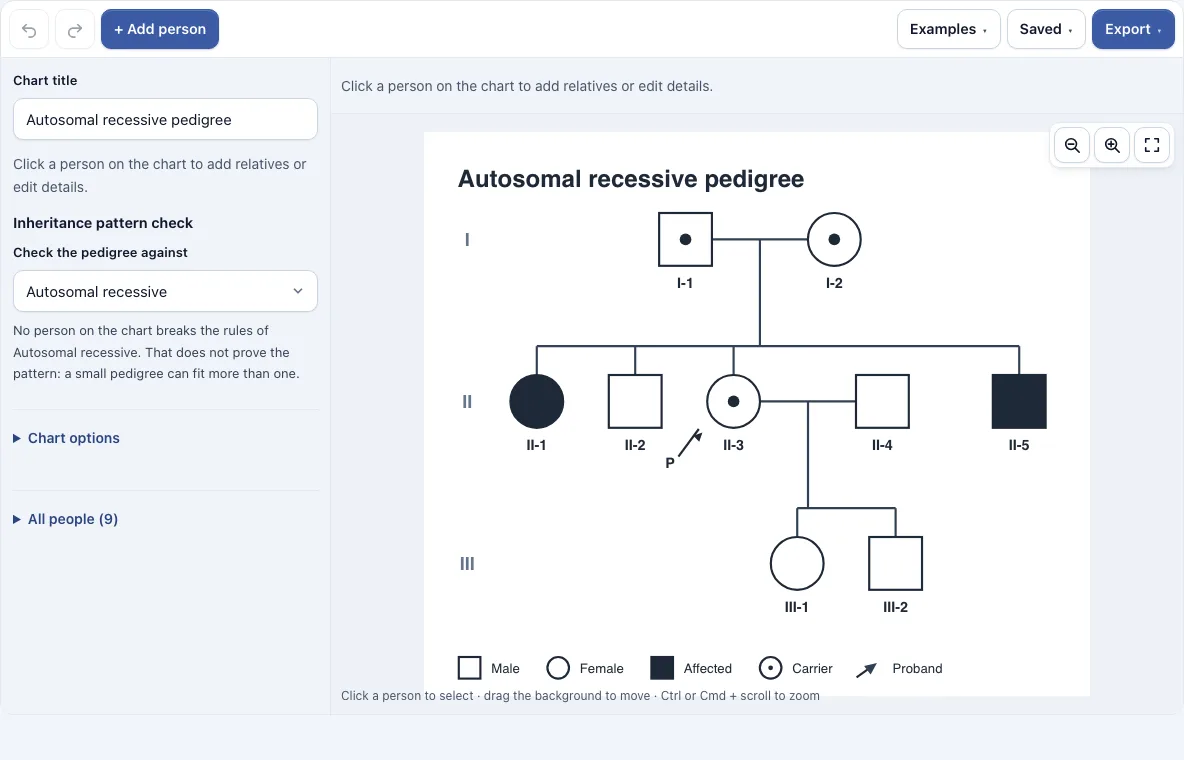
How to use the pedigree chart maker
- Open the Examples menu to load a ready-made pedigree, or keep the sample chart that opens with the page.
- Click + Add person to place a new symbol on the chart.
- Click a person to select them. Use the Partner, Child, Parents or Sibling buttons in the bar above the chart to add relatives connected to that person.
- In the side panel, set the name, sex, born and died dates, adopted or deceased details, status (Unaffected, Affected or Carrier) and proband marker.
- In the Couples section, mark a couple as related if they are consanguineous.
- In the side panel, choose an inheritance pattern to run the pattern check. People who break that pattern’s usual rules are listed.
- Use the trash button in the bar above the chart to delete a selected person.
- Open the Export menu when the chart is finished.
Turn off Number the symbols if you do not want the I-1, II-2 style labels. Drag the background to move around, and use Undo, Redo and the zoom buttons while you work. The Saved menu autosaves the chart in this browser, saves named copies and copies a share link. The Export menu offers PNG (normal, 2x or 4x), SVG and PDF, with no watermark.
What do pedigree chart symbols mean?
A square is a male, a circle is a female, and a diamond is a person of unknown or other sex. A filled-in symbol is an affected person, and a carrier has a dot in the middle, which means they carry one copy of a recessive variant without showing the trait. A slash through a symbol means the person has died.
Lines show family links. A horizontal line between two people is a couple, and a line from that couple goes down to their children. A double line joins a couple who are related to each other, which is called consanguineous. Generations run in rows labelled I, II, III, and each symbol is numbered from the left within its row. An arrow with the letter P marks the proband, the person who brought the family to attention.
How to tell autosomal dominant from recessive on a pedigree
Autosomal dominant traits usually appear in every generation. An affected person typically has an affected parent, because one copy of the variant is enough to show the trait. Affected people can have unaffected children, and each child has about a one in two chance of inheriting the variant.
Autosomal recessive traits often skip generations. Two unaffected carriers can have an affected child, so an affected person may have unaffected parents. An unaffected child of two affected parents is the clearest sign that a trait is not recessive, because both affected parents must pass on a variant.
The pattern check in the tool applies these rules. For autosomal dominant, it flags an affected person whose two parents are both on the chart and both unaffected. For autosomal recessive, it flags an unaffected child of two affected parents. Carriers count as unaffected in these checks. A flagged person does not prove the pattern is wrong, since a new mutation or reduced penetrance can explain an unexpected result. A small pedigree can also fit more than one pattern, so the check can show that a pattern does not fit but cannot confirm one.
Frequently asked questions
Is there a pedigree chart template?
Yes. The Examples menu loads three ready-made pedigrees: autosomal recessive with carrier parents, autosomal dominant passed from parent to child, and X-linked recessive with a carrier mother. The page opens with the first of them. Replace the made-up people with your own family, or use an example as a starting layout.
Is my pedigree uploaded?
No. Everything stays in your browser, and nothing is uploaded. Autosave and named copies use your browser’s storage. A share link holds the pedigree inside the link itself, so anyone with the link can open the chart.
What is a proband?
The proband is the person whose condition or trait first brought the family to attention, such as the person who came to a clinic. In this tool, a proband is marked with an arrow and the letter P, and you set it in the side panel.
How do I read a pedigree chart?
Start at the top row (generation I) and move down one row at a time. Lines between symbols show couples, and lines below them show children. Use the numbers to refer to specific people, and check the legend under the chart to confirm what each symbol means.
Can the pattern check prove a trait is dominant or recessive?
No. The check only lists people who break the usual rules of the pattern you choose. A small family can match more than one pattern, so a clean result does not confirm a pattern, and a flagged result does not prove the chosen pattern is wrong.
Is the pedigree chart maker medical advice?
No. It is a study aid for drawing and checking family charts. If you have questions about a genetic condition in your family, speak with a doctor or genetic counselor.
Can I use my pedigree charts commercially?
Yes. Pedigree charts you make here are yours to use for personal, school and commercial work. No credit is required. The only thing you may not do is copy the tool or the site itself to run a competing service; see the terms.
Related tools
- Genogram maker: Use it when you want to show family relationships and emotional or social connections alongside health information.
- Family tree maker: Use it when you want to record ancestors and descendants without the genetics symbols.
- Family tree chart: Use it to print a blank or filled-in chart of one person’s ancestors.
- Family trees and genealogy: Use it to browse every family tree and genealogy tool in this group.
- Flowchart maker: Use it to draw general diagrams, such as process steps or decision trees.