Mind Map Maker
Build a mind map with the keyboard or mouse, switch layouts and themes, and edit it as text. Export PNG, SVG or PDF, free and without sign-up.
Free · runs in your browser · nothing is uploaded
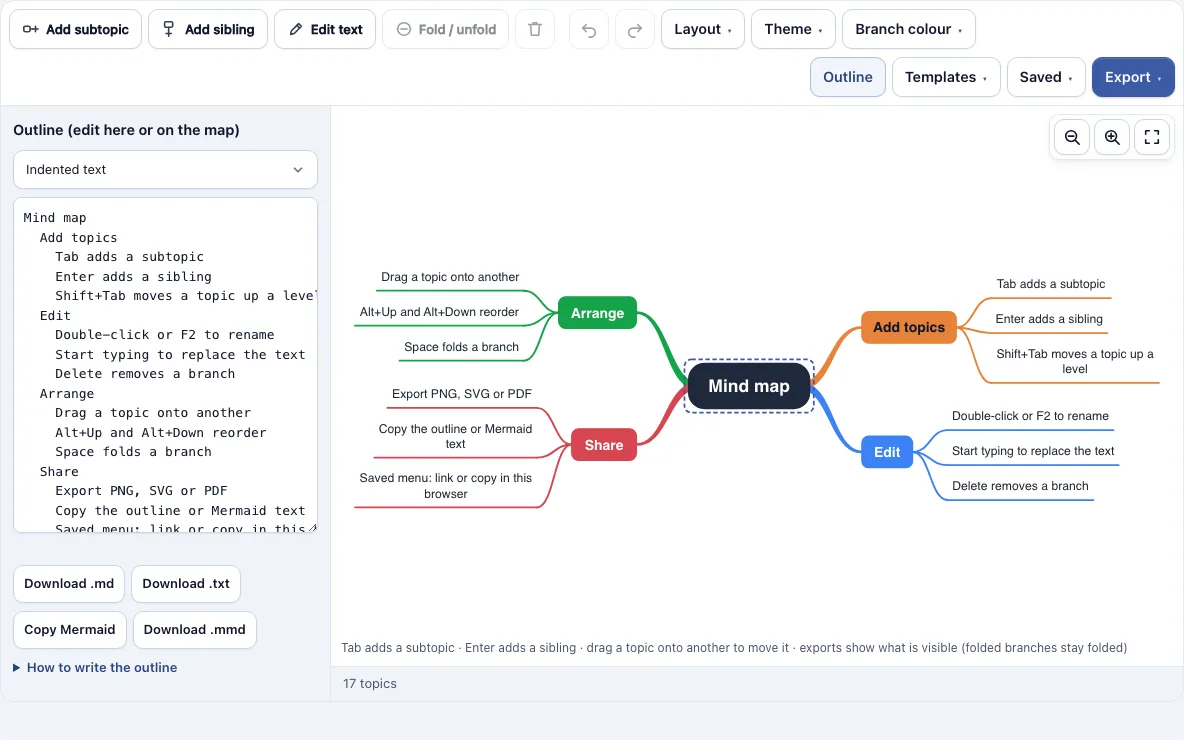
How to use the mind map maker
- Open the page. It loads a sample map called “Getting started” that lists the main shortcuts. Or pick one of the ten templates in the Templates menu.
- Click the central topic and type to replace its text, or press F2 to edit it.
- Select a topic and press Tab to add a subtopic under it. The new topic’s text box opens straight away. Press Enter to save.
- Press Enter on a selected topic to add a sibling at the same level.
- Press Shift+Tab to move a topic up one level, or Alt+Up and Alt+Down to reorder siblings.
- Drag a topic onto another topic to make it a subtopic. Drop it on the top or bottom edge of a topic to place it before or after that topic.
- Open the Layout menu and choose a layout.
| Layout | Shape |
|---|---|
| Mind map (both sides) | Main topics split left and right of a centred central topic |
| Logic chart (to the right) | Everything grows to the right |
| Org chart (downwards) | Central topic on top, main topics in a row, subtopics below |
- Open the Theme menu and pick one of five themes. Use the Branch colour menu to colour the selected topic and everything under it.
- Open the Export menu to save a PNG, PNG at 2x or 4x, SVG or PDF.
Ctrl+Z undoes a change; Ctrl+C and Ctrl+V copy a branch to another topic. A map holds up to 500 topics.
What is a mind map?
A mind map is a diagram with one central topic in the middle and branches that radiate out to main topics, then to smaller subtopics. Each branch usually carries a short keyword, and each main branch gets its own colour. The British author Tony Buzan popularised the term in the 1970s, including in his BBC TV series and his 1974 book Use Your Head.
Branches in a mind map carry no labels. A concept map is different: every link in it has a linking phrase that explains how two ideas relate.
How to make a mind map
Start with the main subject in the centre, then add main topics around it. Give each main topic a few short keyword subtopics, and use one colour per branch. Move branches around until related ideas sit together, and fold any detail you don’t need to see right now.
- Write the main subject in the centre.
- Add three to seven main topics around it.
- Add short keyword subtopics under each main topic.
- Use one colour per branch.
- Reorder or move branches until related ideas sit together, then fold the detail you don’t need to show.
Mind map examples
The Templates menu loads ten mind map examples that you can edit, and each one also works as a mind map template for your own topic. Pick one, replace the words and keep the structure. Loading a template can be undone with Undo.
| Template | Layout | What it shows |
|---|---|---|
| Brainstorm (5W1H) | Mind map | A community garden explored with Why, Who, What, Where, When and How |
| Project plan | Logic chart | Goals, scope, timeline, team, risks and budget of a website redesign |
| Essay outline | Logic chart | Introduction, three body paragraphs and conclusion |
| Study notes: photosynthesis | Mind map | Inputs, chloroplasts, light-dependent reactions, Calvin cycle, outputs and the equation |
| Meeting notes | Logic chart | Attendees, agenda, decisions and action items with owners |
| SWOT analysis | Mind map | Strengths, weaknesses, opportunities and threats of a neighbourhood bakery |
| Goal setting (SMART) | Mind map | A half marathon goal broken into the five SMART parts and milestones |
| Product launch | Mind map | Research, product, marketing, sales, launch day and follow-up |
| Weekly planner | Org chart | Work, health, home, learning and people for one week |
The Getting started map lists the main shortcuts.
Frequently asked questions
Can ChatGPT create a mind map?
ChatGPT and other AI chat tools can write a mind map as text, such as an indented outline, a Markdown list or Mermaid mindmap code. That result is text, not a drawing. Paste it into the Outline panel of this tool and it becomes an editable mind map that you can export.
What is the best free mind map maker?
The right choice depends on what you need. Look for a tool that is free and doesn’t require an account, keeps your map on your device, offers the export formats you need, and lets you edit an outline as text. This mind map maker is free, needs no sign-up, saves in your browser and exports without a watermark.
Can I import or export a Mermaid mindmap?
Yes, in both directions. Paste a Mermaid mindmap block into the Outline panel and it becomes a map. Node shapes such as [square], (rounded) and ((circle)) are read as plain topics, and ::icon lines are skipped. Copy Mermaid or Download .mmd exports the map as Mermaid code, with the central topic written as root((…)).
Can I turn an outline or Markdown list into a mind map?
Yes. Open the Outline panel and type or paste your outline in Indented text or Markdown format. Put one topic on each line, indent with two spaces or a tab for a subtopic, and make the first line the central topic. Markdown headings and bullets also work, and edits in the outline redraw the map while changes on the map update the outline.
Do folded branches show in the export?
Folded branches stay folded in the export. Each one shows a small circle with the number of hidden topics. To export everything, choose Unfold all branches from the Layout menu first.
Is my mind map uploaded or saved?
The map is not uploaded. It stays in your browser, and the latest version saves there automatically. The Saved menu can keep named copies, and a copied link holds the whole map inside the link, so nothing is stored on a server.
Can I use my mind maps commercially?
Yes. Mind maps you make here are yours to use for personal, school and commercial work, including reports, slides, books and printables you sell. No credit is required. The only thing you may not do is copy the tool or the site itself to run a competing service; see the terms.
Related tools
- Concept map maker: use it when you need labelled links that explain how ideas relate.
- Tree diagram maker: use it when your ideas form a strict hierarchy, such as categories and their items.
- Venn diagrams, concept maps and tree diagrams: see every tool in this group on one page.
- Flowchart maker: use it when you need to show steps and decisions in order.
- Org chart maker: use it when you want to show reporting lines or team structure.
- SWOT analysis maker: use it to sort strengths, weaknesses, opportunities and threats into four boxes.
- Timeline maker: use it to place events along a line of dates.
- All Diagram Smith tools: browse every tool on the site.