Genogram Maker
Draw a family with relationship lines and conditions, and download the genogram.
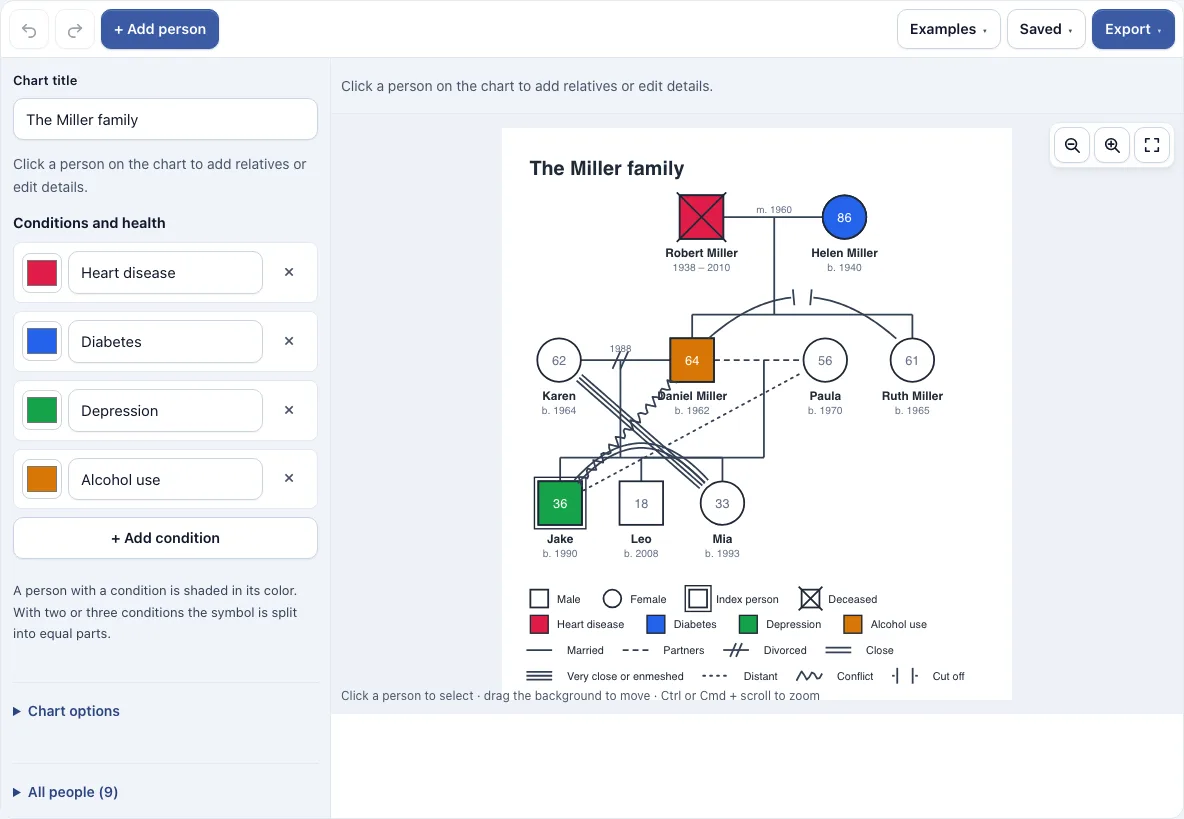
How to use the Genogram maker
- Open the page. The Miller family sample loads. To start a new chart, open the Saved menu and choose Start a new, empty one, or load the Blank three-generation starter from the Examples menu.
- Press + Add person, then click a person to select them.
- In the side panel, enter the first name, last name, sex and birth year. Tick index person for the person the genogram is about.
- Use the Partner, Child, Parents and Sibling buttons above the chart to add relatives. The layout places generations in rows and children under their parents.
- Set the status of a couple to Married, Partners, Separated or Divorced.
- Under Conditions and health, add up to six conditions, each with a name and a color. Tick a condition for a person to shade their symbol.
- To draw a relationship, select a person, choose a type under Relationship lines, pick the other person and press Add.
- Check the legend under the chart, then export the image from the Export menu.
Use the Zoom out, Zoom in and Fit buttons, or hold Ctrl (or Cmd) and scroll to zoom. Drag the background to move around the chart, and use Undo and Redo to correct mistakes. The Saved menu keeps your chart in this browser, saves named copies, and copies a link that contains the chart. Export options include PNG, PNG 2x, PNG 4x for print quality, SVG, PDF and Copy image to clipboard.
What is a genogram?
A genogram is a family tree that records more than names and births. It shows how people in a family are connected and adds facts such as illness, other conditions, separations and conflicts. Counselors, social workers and doctors use genograms to see patterns across several generations at a glance.
Because every person and relationship is drawn in the same way, a reader can compare who was married, who separated, and which conditions appeared in which branch of the family.
What do genogram symbols mean?
Genogram symbols follow a set of conventions. A square represents a man, a circle represents a woman, and a diamond represents a person of unknown or other sex. A cross through a symbol means that person has died. A double outline marks the index person, the one the genogram is about. When a birth year is given for a living person, their age appears inside the symbol.
Couples are shown with lines between them. A solid line means married, and the date of marriage is written beside it. A dashed line means partners who are not married. One slash means separated, and two slashes mean divorced. An adopted or foster child is joined to the parents by a dashed line.
What do the relationship lines in a genogram show?
Emotional relationship lines show how two people get along, separately from the marriage and parent lines. In this tool, two parallel lines mean close, three lines mean very close or enmeshed, a dotted line means distant, a zigzag means conflict, and a line broken by two ticks means cut off. Abuse is a zigzag with an arrow pointing to the person abused, and a plain arrow shows one-sided focus. The legend under the chart lists only the symbols and lines you have used.
Frequently asked questions
How do I make a genogram?
Add people with + Add person, link them with the Partner, Child, Parents and Sibling buttons, and mark one person as the index person. The layout arranges the chart for you, so you only need to enter names, sexes and dates.
How do I show a conflict or a close relationship between two people?
Select one of the two people, choose a type under Relationship lines, select the other person, and press Add. Close is drawn with two parallel lines, Very close or enmeshed with three, Distant with a dotted line and Conflict with a zigzag line. Cut off is a broken line with two bars, Abuse is a zigzag with an arrow pointing to the abused person, and Focus is a one-sided line with an arrow. You can change or remove a line later.
How do I show illness or a condition on a genogram?
Under Conditions and health, add a condition with a name and color, then tick it for each person affected. Their symbol is shaded in that color, and the chart gets a legend listing the conditions used. You can add up to six conditions.
Is there a genogram template?
The Examples menu includes a Blank three-generation starter, which works as a genogram template you can fill in. It also offers Three generations, which shows illness, divorce and conflict, and Step-family with an adopted child.
Is my genogram uploaded?
No. Everything stays in your browser, and nothing is uploaded. Autosave and named copies use your browser’s storage. A share link holds the genogram inside the link itself, so the chart travels with the link rather than being stored on a server.
Can I use my genograms commercially?
Yes. Genograms you make here are yours to use for personal, school, client and commercial work. No credit is required. The only thing you may not do is copy the tool or the site itself to run a competing service; see the terms.
Related tools
- Family tree maker: use it when you want a standard family tree that shows names and birth dates without relationship or health details.
- Pedigree chart maker: use it when you need a chart that traces how a trait or inherited condition passes through a family.
- Family tree chart: use it to print a blank or filled-in chart of one person’s ancestors.
- Family trees and genealogy: use it to browse every family tree tool in this group.
- Flowchart maker: use it when you need to map steps or decisions rather than family relationships.