Gauge Chart Maker
Set the value, the scale and the colored zones; the gauge redraws as you type and a sentence tells you how to read it.
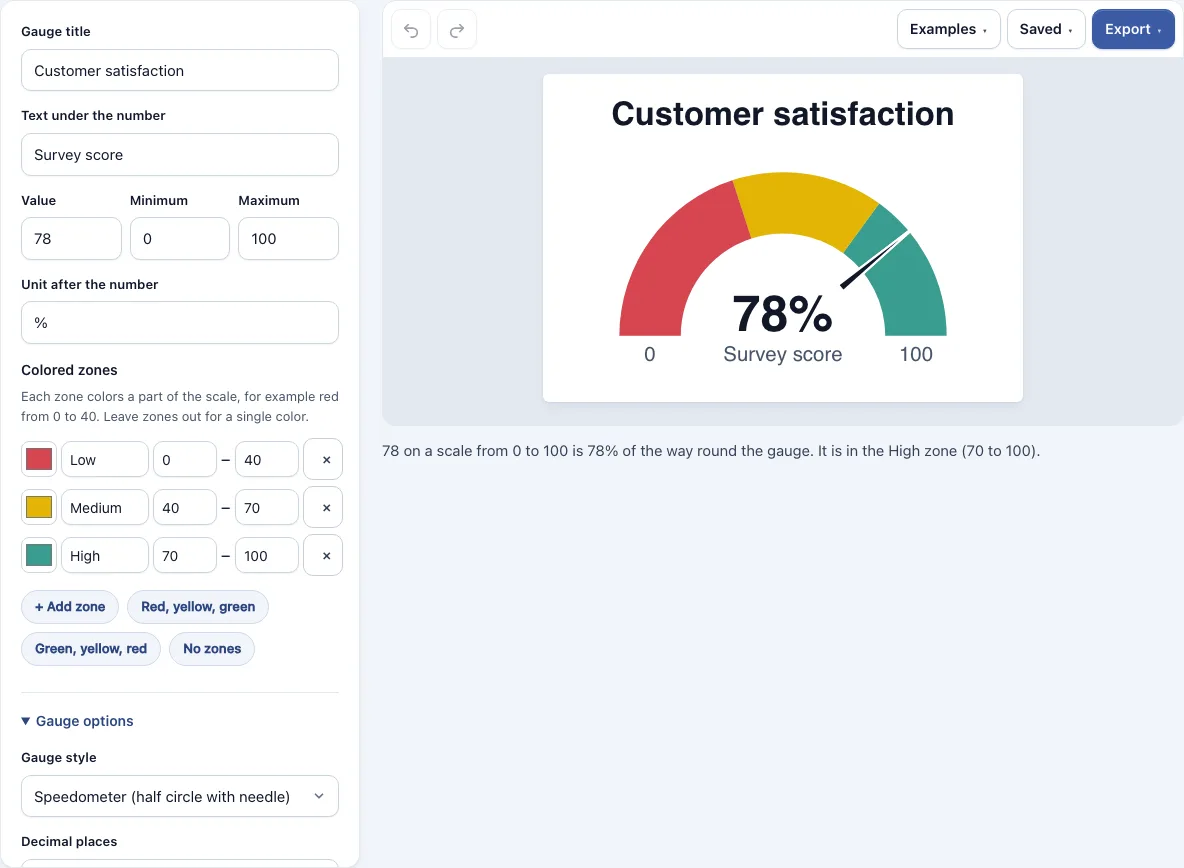
How to use the gauge chart maker
- Open the tool. The Customer satisfaction example loads at 78%. To start from another example, open the Examples menu and pick Car speedometer, Sales goal progress or Battery level.
- Type a Gauge title and the Text under the number.
- Enter the Value, the Minimum and the Maximum. The maximum must be larger than the minimum.
- Add a Unit after the number, such as % or km/h.
- Set the zones. Pick the preset Red, yellow, green or Green, yellow, red, use + Add zone to build your own, or choose No zones for a single color. Each zone needs a color, a name, a start and an end.
- Choose a gauge style: Speedometer, Half circle filled up to the value, or Full ring filled up to the value.
- Adjust the options: Decimal places, the Arc thickness slider, Show the minimum and maximum, and Target mark.
- Read the sentence under the gauge. It states where the needle points and which zone the value is in.
- Export the chart as PNG (standard, 2x or 4x), SVG, PDF, or copy the image to the clipboard.
Use Undo and Redo while you edit. Your work is saved automatically in this browser. From the Saved menu, choose Save a copy in this browser to keep a named version, Copy link to this diagram to share the whole gauge, or Start a new, empty one. The shared link stores the gauge after the # sign, so the chart is not sent to any server.
What is a gauge chart
A gauge chart shows a single value against a fixed scale with a known start and end. The scale runs around a half circle or a full ring, and the needle or filled part marks where the value sits. People use this shape because it reads quickly, much like the dial of a car. Many gauge charts also add colored bands, so the value can be judged as low, medium or high.
A gauge works best when its limits are clear, such as 0 to 100 for a percentage or 0 to 200 km/h for a speed. The minimum sits at the left end and the maximum at the right end. Because the scale is fixed, a needle in the same position always means the same share of the way along the scale.
How to read a gauge chart
Start with the scale. Find the minimum at the left end and the maximum at the right end, then look at where the needle or filled part stops. A needle halfway round means the value is about halfway between the two limits, whatever those limits are. The exact figure is usually printed in the middle, so use that number when you need precision rather than estimating from the angle.
Next, look at the color band the needle is in. The bands are thresholds that someone chose, so they show whether the value is low, medium or high according to that choice, not according to a universal rule. Check the labels on the chart to see what each band means. A gauge shows one number at one moment, so it cannot show a trend over time or compare several numbers well.
The sentence under the gauge in this tool does the reading for you: it gives the value as a share of the way round the scale and names the zone it is in. Use it as a check when you pick the zones, because a zone boundary that sits exactly on your value belongs to the lower zone.
Frequently asked questions
What do the red, yellow and green zones mean?
Zones are ranges you set, each with a color, a name, a start and an end value. Red, yellow and green are a common choice, not a fixed meaning. In the default example, 0 to 40 is red (Low), 40 to 70 is yellow (Medium) and 70 to 100 is green (High). Rename the zones and change their ranges so they match what your number measures.
When should I use a gauge chart?
Use a gauge chart for one key figure that has known limits, such as a score, a speed, a fill level, progress toward a goal or a percentage. It suits readers who need a quick sense of how close a value is to its limit. If you have several values or need to show change over time, a bar chart or line graph is clearer.
How do I make a speedometer chart?
Open the Examples menu and choose Car speedometer to see a dial with a 0 to 200 km/h scale. Replace the title, value, minimum, maximum and unit with your own figures. Keep the Speedometer style if you want the needle over colored bands.
What happens if my value is outside the scale?
The value must be a number that sits inside the scale. If it falls outside, the needle stops at the end of the scale instead of showing the real figure. Raise the maximum or lower the minimum so the value fits.
Can I add a target to a gauge chart?
Yes. Enter a value in the Target mark box, and the tool draws a line at that point on the scale. The sentence under the gauge then says whether the target has been reached or how far below it the value is.
Is the gauge chart maker free, and do I need an account?
Yes, the tool is free and needs no sign-up. Your work is saved automatically in your browser, and nothing is uploaded.
Can I use my gauge charts commercially?
Yes. Everything you make here is yours to use for personal, school and commercial work, including reports, slides, books and printables you sell. No credit is required. The only thing you may not do is copy the tool or the site itself to run a competing service; see the terms.
Related tools
- Pie chart maker: use it to show how parts make up a whole, such as shares of a budget.
- Line graph generator: use it when you need to show how a value changes over time.
- Sankey diagram generator: use it to show how quantities flow from one stage to another.
- Charts and graphs: browse all the chart tools in one place.