Family Tree Maker
Add people and relatives, and the family tree lays itself out. Import a GEDCOM file, then download the tree.
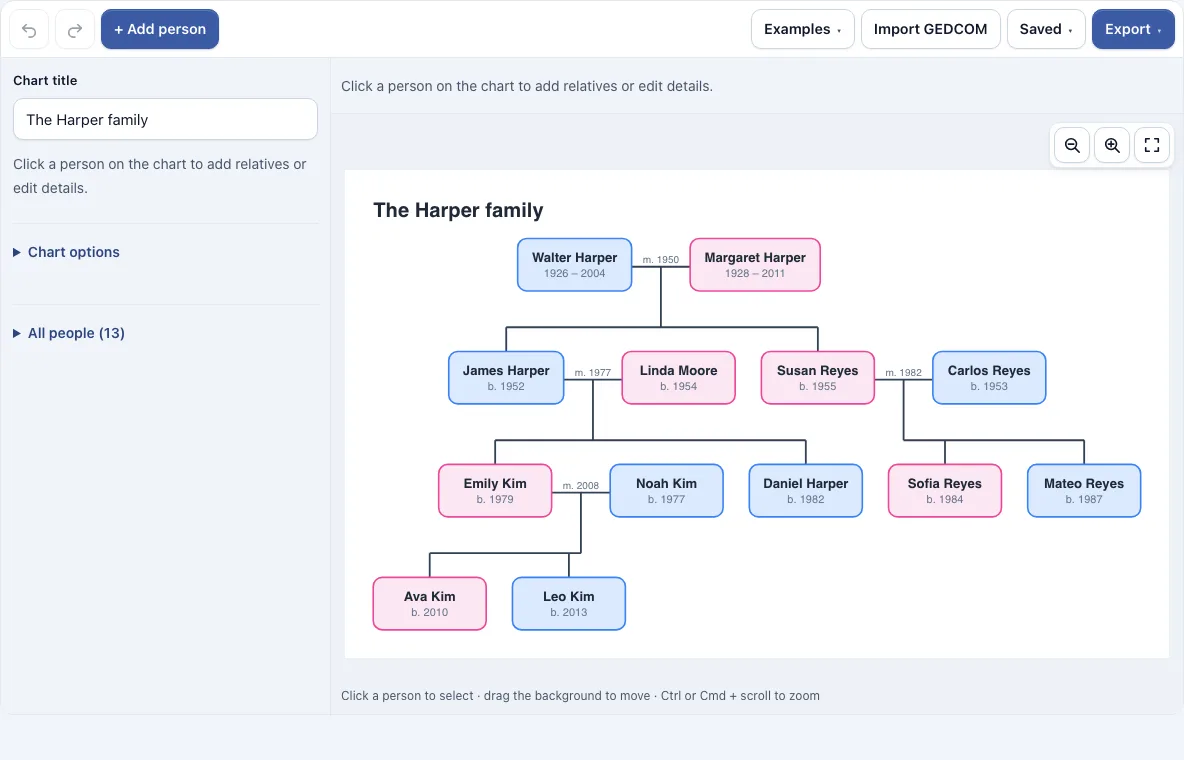
How to use the family tree maker
- Open the page. The Harper family sample loads so you can see a finished chart. To begin with your own family, open the Saved menu and choose Start a new, empty one, which gives you a chart with one person ready to name.
- Click a person on the chart to select them. A bar appears above the chart. Press + Add person to add a separate person at any time.
- Type the person’s name in the side panel.
- Use the bar to build the tree. Partner adds a partner, Child adds a child, Parents adds a father and a mother, and Sibling adds a brother or sister.
- Fill in the side panel: First name, Last name, Sex, Born, Died and Notes. Tick Deceased (date unknown) or Adopted or foster child where they apply.
- For a couple, open the Couples section and set the Status (Married, Partners, Separated or Divorced) and a Date.
- Use the Photo field in the side panel if you want a picture.
- Repeat until everyone is on the chart. To remove a person, select them and press the trash button on the bar.
Drag the background to move around and use the zoom buttons to resize the view. Show dates, Show photos and Color boxes by sex change what the boxes show. The Export menu offers PNG (normal, 2x or 4x), SVG and PDF without a watermark, and the Saved menu keeps named copies and copies a share link.
How to make a family tree
A family tree is built from people and the links between them, not from free-standing boxes. Each relationship is a link: a couple, or a parent and child. This tool places each person in a row for their generation, puts partners side by side, and centres children under their parents. When birth years are known, siblings are ordered oldest first. Because the layout is automatic, you only need to add relationships correctly, and the chart follows.
What is a GEDCOM file
GEDCOM is a plain-text file format for family tree data, and most genealogy software can write it. It stores people, couples, children, dates and notes in a standard layout, so one program can read what another has written. This tool’s export writes version 5.5.1 with people, couples, children, dates and notes. It does not include photos.
Can I import a GEDCOM file
Yes. Import GEDCOM reads a .ged file from another genealogy program. It brings in names, sex, birth and death dates, notes, couples with a marriage date and divorce, children, and adopted or foster links. The import understands UTF-8, UTF-16 and older ANSI files. Places, sources, events and media in the file are ignored, and a file with more than 1,000 people is refused.
Is my family data uploaded
No. Everything stays in your browser, and no family data is uploaded. Autosave and named copies use the browser’s storage. A share link holds the tree inside the link itself, so the link carries the data, and anyone you send it to can open the tree.
Can I add photos
Yes. Choose a photo in the Photo field of the side panel. The photo is shrunk to 96 pixels and shown as a small circle in the person’s box. Photos stay in your browser, and they are left out of share links and GEDCOM exports.
How do I show a divorce or a second marriage
Use the Couples section of the side panel. Each couple of the selected person appears with a Status and a Date. Partners are joined by a dashed line, a separated couple has one slash through the line, and a divorced couple has two. When a person has two partners, their children hang from the line of the right couple, and that person sits between the two partners. The Divorce and a second marriage example in the Examples menu shows this layout.
How many people can a tree have
A tree can hold up to 1,000 people. A GEDCOM file with more than 1,000 people will not import, so a larger family cannot be loaded in one file.
Can I print or download the tree
Yes. The Export menu saves the chart as PNG, PNG 2x, PNG 4x (print quality), SVG or PDF, and it can also copy the image to the clipboard. The PNG 4x option is the one to choose for printing. Exports have no watermark.
Frequently asked questions
Is this family tree maker free, and do I need an account?
Yes, it is free and needs no account. It runs in your web browser, so you can start straight away.
Can I start with my own family instead of the sample?
Yes. Change the Harper family’s names and details, or open the Saved menu and start a new chart. The Examples menu also loads two other sample trees if you want a different starting point.
How do I delete a person or undo a mistake?
Select the person on the chart and press the trash button on the bar above it. If you delete the wrong person, press Undo, and press Redo to bring back a change you reversed.
What does the Adopted or foster child box do?
It appears when the selected person has parents. Ticking it joins the child to the parents with a dashed line instead of a solid one.
What should I enter in the Born and Died fields?
Type whatever you know, such as 1950 or 12 Mar 1950. The chart shows these as “b. 1950” or “1926 – 2004”. If you do not know a death date but the person has died, tick Deceased (date unknown).
How do I keep my chart for later?
The chart is saved automatically in your browser. For a second version, save a named copy from the Saved menu. To share a copy with someone else, copy a link from the same menu.
How do I add a title to the chart?
Type into the Chart title field. The text you enter becomes the heading of the chart and appears in your exports.
Can I use my family trees commercially?
Yes. Trees you make here are yours to use for personal, school and commercial work, including books, posters and printables you sell. No credit is required. The only thing you may not do is copy the tool or the site itself to run a competing service; see the terms.
Related tools
- Genogram maker: use this when you need to show emotional relationships or patterns, not just births, marriages and divorces.
- Family tree chart: use this to print a blank or filled-in ancestor chart as a pyramid, horizontal chart or fan.
- Pedigree chart maker: use this to chart how a trait or condition is inherited, with the standard genetics symbols.
- Family trees and genealogy: browse every family tree and genealogy tool in this group.
- Flowchart maker: use this when you need to diagram steps or decisions rather than people.