Family Tree Chart
Pick a layout and the number of generations, then print a blank family tree or type the names in.
The family tree chart is a free tool that runs in your web browser and makes a printable ancestor chart, a family tree diagram that goes back from one person. It starts with one person and shows their ancestors back 2 to 6 generations, which is 3 to 63 people. You can choose a Pyramid, Horizontal or Fan layout, and you do not need an account to use it.
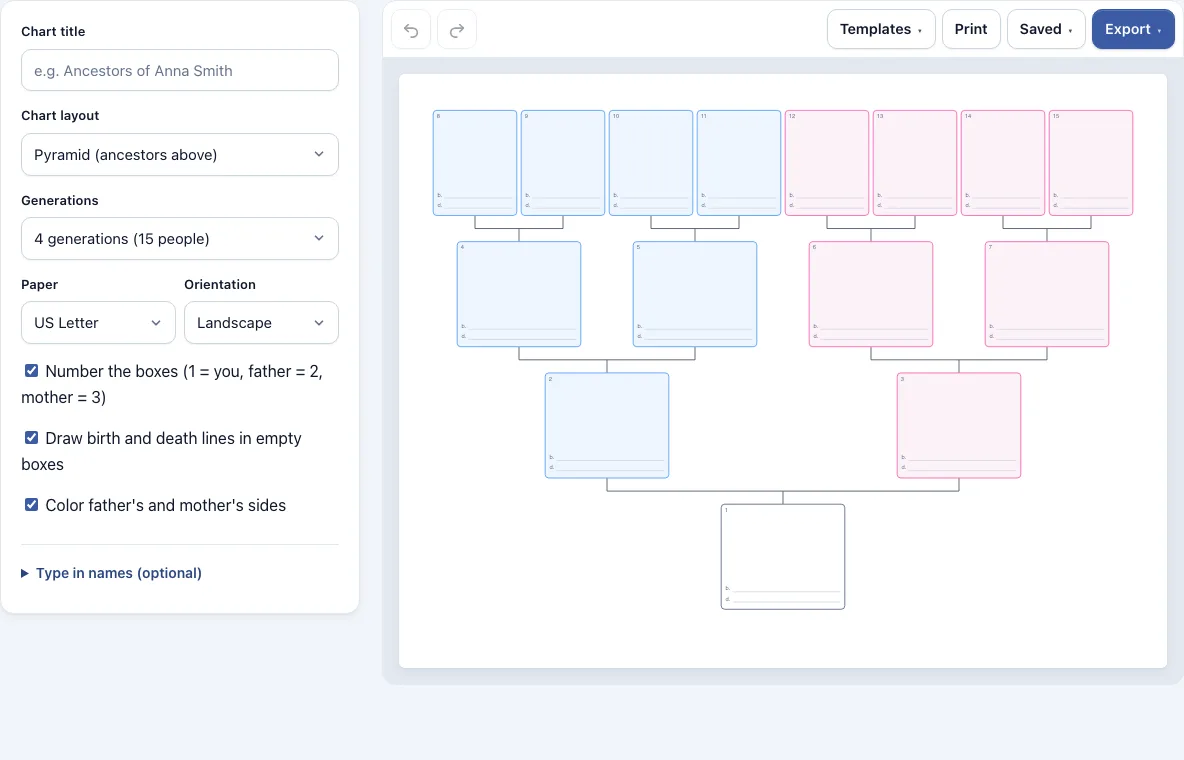
The tool opens with a blank four-generation pyramid. You can leave it blank to fill in by hand, or type names and years into the chart. The page is drawn at the exact size of your paper, so the chart you see on screen is the same size as the printout. You can also export it as a PDF or as an image.
How to use the Family Tree Chart
- Open the tool. It starts with a blank four-generation Pyramid chart. To begin from a ready-made layout, open the Templates menu and pick one.
- Type a name in the Chart title field.
- Under Chart layout, choose Pyramid, Horizontal or Fan.
- Under Generations, pick a number from 2 to 6.
- Under Paper, choose US Letter or A4, then set Orientation to Landscape or Portrait.
- Turn Number the boxes on or off. Optionally, tick Draw birth and death lines in empty boxes or Color father’s and mother’s sides.
- Under Type in names (optional), enter a Name and Years for each position, such as Father or Maternal grandmother. Leave these empty if you want a blank chart to fill in by hand.
- Check the chart on screen, then press Print, or use the Export menu to save a PDF or image.
The Print button opens your browser’s print dialog for the chart page. PDF export gives a one-page PDF of the same size as the chart. The Saved menu keeps an autosave in your browser, lets you make named copies, or creates a share link that holds the chart inside the link. Undo and Redo buttons let you reverse changes while you work.
What do the numbers on an ancestor chart mean
Each box on the chart has a number that shows how the person is related to the starting person. The starting person is 1. A father is always twice the number of his child, and a mother is that number plus one. So the father is 2 and the mother is 3, the father’s parents are 4 and 5, and the mother’s parents are 6 and 7.
This system is called Ahnentafel numbering, and genealogists use it because it shows the exact path back through the family. Once you know a number, you can work out the others. For example, box 10 is the father of box 5, and box 11 is the mother of box 5. If you turn Number the boxes off, the chart looks cleaner, but the numbers are no longer shown.
How many generations should a family tree chart have
The number of generations is the number of rows on the chart, and the starting person’s row counts as the first. Two generations gives the starting person and their parents, which is 3 people. Six generations gives 63 people, because each row has twice as many boxes as the row above it: 1, 2, 4, 8, 16 and 32.
Choose a small number if you only want the immediate family, or a larger one if you have records going further back. Remember that the chart only has room for ancestors. Each extra generation doubles the number of boxes, so fewer generations are easier to read and fill in. On one sheet of paper, four or five generations usually leave room to write by hand.
Which family tree layout should I choose?
The Pyramid layout puts the starting person at the bottom and the ancestors above, like a tree. The Horizontal layout puts the starting person on the left and runs the ancestors to the right, which suits landscape paper. The Fan layout arranges each generation in a curved band, which fits many people on one page.
Frequently asked questions
Where can I get a blank family tree to print?
The tool opens with a blank four-generation pyramid, so you can print it straight away. Leave the Name and Years boxes empty, then press Print. Change the Generations setting first if you need a different size.
Is there a family tree template I can print or fill in?
Yes. The Templates menu includes Pyramid charts with 4 and 5 generations, Horizontal charts with 4 generations (portrait) and 5 generations, a Fan chart with 5 generations, and a filled-in example with 3 generations. The filled-in example uses made-up names, so you can see how a completed chart looks.
Can I print it on A4 or Letter paper?
Yes. Under Paper, choose US Letter or A4. The page is drawn at the exact size of the paper you choose, so the printout matches what you see on screen.
Can I fill it in on screen?
Yes. Type names and years into the Name and Years boxes for each position. Your work is autosaved in your browser, and Undo and Redo help you correct mistakes. You can also print a blank chart and write on it by hand.
Does the chart show brothers, sisters or children?
No. The tool only shows ancestors, which is the line back from one person. For a full tree that includes siblings, partners or children, use the family tree maker.
Is my family information uploaded anywhere?
No. Everything stays in your browser, and nothing is uploaded. Autosave and named copies use your browser’s storage. A share link holds the chart inside the link itself.
Can I use my family tree charts commercially?
Yes. Charts you make here are yours to use for personal, school and commercial work, including printables you sell. No credit is required. The only thing you may not do is copy the tool or the site itself to run a competing service; see the terms.
Related tools
- Family tree maker: Use this when you want a full family tree that includes siblings, partners and children, not just ancestors.
- Genogram maker: Use this when you need to show family relationships and patterns, such as conflict or closeness, alongside the family structure.
- Pedigree chart maker: Use this to chart how a trait or condition is inherited, with the standard genetics symbols.
- Family trees and genealogy: Browse every family tree and genealogy tool in this group.
- Flowchart maker: Use this when you want to map a process or decision steps rather than people.