ER Diagram Maker
Write your tables and columns as text and the entity relationship diagram is drawn as you type; export it as an image or as SQL CREATE TABLE statements.
How to use the ER diagram maker
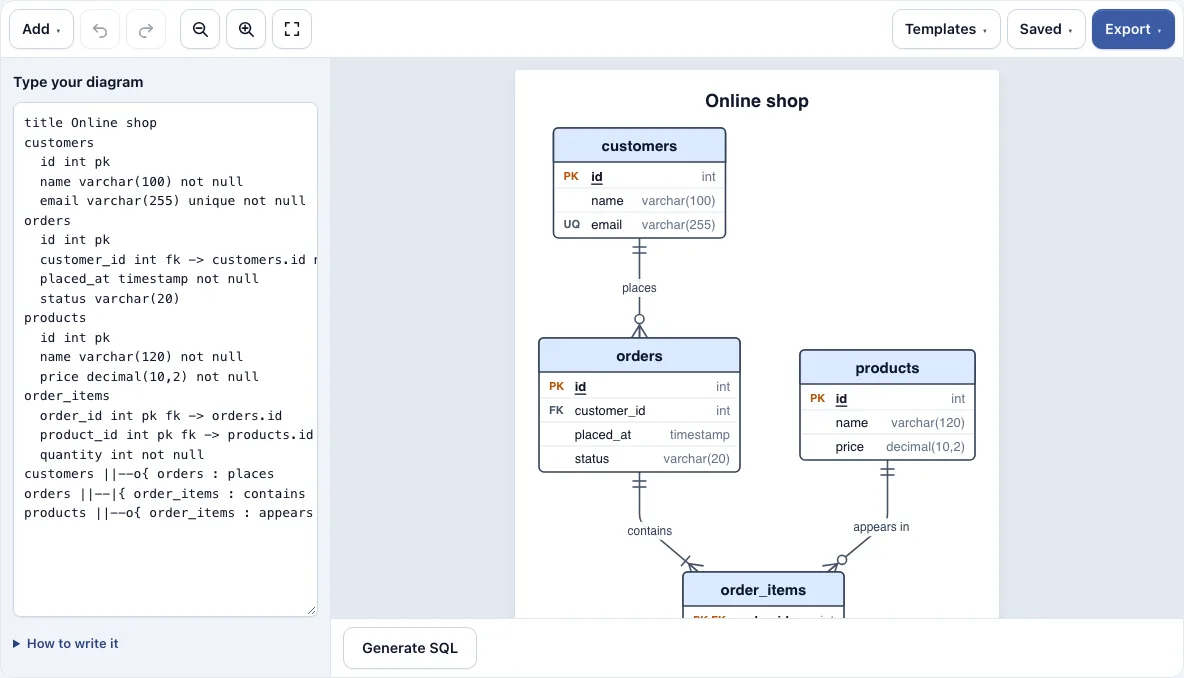
- Look at the online shop example in the text box on the left. To start a different diagram, open the Templates menu and load Online shop, School (many-to-many) or Blog. Loading a template can be undone.
- Write a table as its name on one line, then one indented line per column, such as
email varchar(255) unique not null. Add pk, fk, unique or not null after the type. - Link tables with a foreign key, such as
user_id int fk -> users.id, or write a relationship between two table names, such asusers ||--o{ orders : places. - Check the diagram on the right as you type. Any line the tool does not understand is listed under the text box with its line number, so you can fix it.
- Add
title My diagramto set a title, ordirection LRto lay the tables out left to right. - If you prefer not to type the syntax, use the Add menu to insert a table or a relationship snippet.
- Use Undo (Ctrl+Z) and Redo (Ctrl+Shift+Z) in the toolbar to step back and forward.
- Open the Export menu to save the diagram as PNG, PNG 2x, PNG 4x, SVG or PDF.
The page saves your latest work in your browser automatically. The Saved menu keeps named copies, copies a link that contains the whole diagram, and starts a new empty diagram. On a phone, the drawing appears above the text box, so use the zoom buttons to read it.
What is an entity relationship diagram?
An entity relationship diagram, or ER diagram, is a picture of the tables in a database and the links between them. Each box is a table, and each line between boxes is a relationship. Each box lists the table’s columns, and key columns are marked: primary keys (PK) uniquely identify each row, foreign keys (FK) point to a primary key in another table, and unique (UQ) columns cannot repeat a value.
A foreign key is how a relationship is stored in a database. For example, an orders table can have a user_id column that holds the id of the user who placed each order. Writing user_id int fk -> users.id stores that link and draws the line automatically. The parent table gets “exactly one” when the column is always filled, or “zero or one” when it can be empty, and the child table gets “zero or many”.
A relationship describes how many rows on each side can match. Ask two questions: how many rows in the other table can one row relate to, and how many rows can relate back to it. The answers decide the line style, which is why the next section matters.
What do the crow’s foot symbols mean?
Crow’s foot notation shows how many rows apply at each end of a relationship line. Read each end separately: the symbol next to a table tells you how many of that table’s rows relate to one row of the other table. The symbols are:
||exactly one|ooro|zero or one}ooro{zero or many}|or|{one or many
Take users ||--o{ orders : places. The || next to users means each order belongs to exactly one user. The o{ next to orders means each user can have zero or many orders. The label “places” describes the relationship in words.
A many-to-many relationship has many rows on both ends, so it is written }o--o{ or *--*. In a database, many-to-many links are stored through a join table, which the SQL generator creates for you.
Frequently asked questions
How do I make an ER diagram?
Open the tool and replace the online shop example in the text box, or start a new diagram from the Saved menu. Write each table, then add foreign keys or relationship lines. The diagram redraws as you type, so you can check each change as you go.
Where can I see an ER diagram example?
The page opens with an online shop example in the text box, so the diagram is visible as soon as the tool loads. The Templates menu also loads School (many-to-many) and Blog, which show other common table layouts.
How do I show a one-to-many or many-to-many relationship?
For one-to-many, write users ||--o{ orders : places or the numeric form users 1--* orders. For many-to-many, write students }o--o{ courses or students *--* courses. Both forms draw the correct crow’s foot ends on the diagram.
Can I turn an ER diagram into SQL?
Yes. The Generate SQL button writes CREATE TABLE statements with PRIMARY KEY, NOT NULL, UNIQUE and FOREIGN KEY constraints, and it creates referenced tables first. You can copy the SQL or download it as a .sql file.
Can I export an ER diagram as PNG, SVG or PDF?
Yes. The Export menu offers PNG, PNG 2x, PNG 4x, SVG and PDF, and it can also copy the image to the clipboard. The exported files have a white background and no watermark.
Is the ER diagram maker free, and do I need an account?
Yes. The tool is free, needs no account, and runs in your web browser. Your diagram is not uploaded anywhere, and the page saves your latest work in this browser automatically.
Can I use what I make with the er diagram maker commercially?
Yes. Everything you make here is royalty-free for personal, classroom and commercial use, including documentation, books and course material. No credit is required. The only thing you may not do is copy the tool or the site itself to run a competing service; see the terms.
Related tools
- UML class diagram maker: use it when you need to model classes, attributes and methods rather than database tables.
- Network diagram maker: use it to draw servers, devices and the connections between them.
- Sequence diagram maker: use it to show messages passing between systems over time.
- Flowchart maker: use it to map steps, decisions and processes.
- Software and network diagrams: see every tool in this group in one place.
- All Diagram Smith tools: browse the full set of diagram tools.