Decision Tree Maker
Draw a decision tree, type the probabilities and payoffs, and see the expected value of every node and the best choice.
The Decision Tree Maker is a free tool that draws a decision tree in your browser and calculates the expected monetary value (EMV) of every node for you. No sign-up is needed. Use it to compare options when some outcomes are uncertain, such as whether to launch a product, build or buy software, or raise a price.
The page opens with a finished example, Launch a new product?, so you can see how a tree works before you build your own. Add choices, uncertain events and outcomes, and the tool fills in the numbers. Your work is saved automatically in your browser, and nothing is uploaded. Think of it as a decision tree generator and creator that works online, with no software to install.
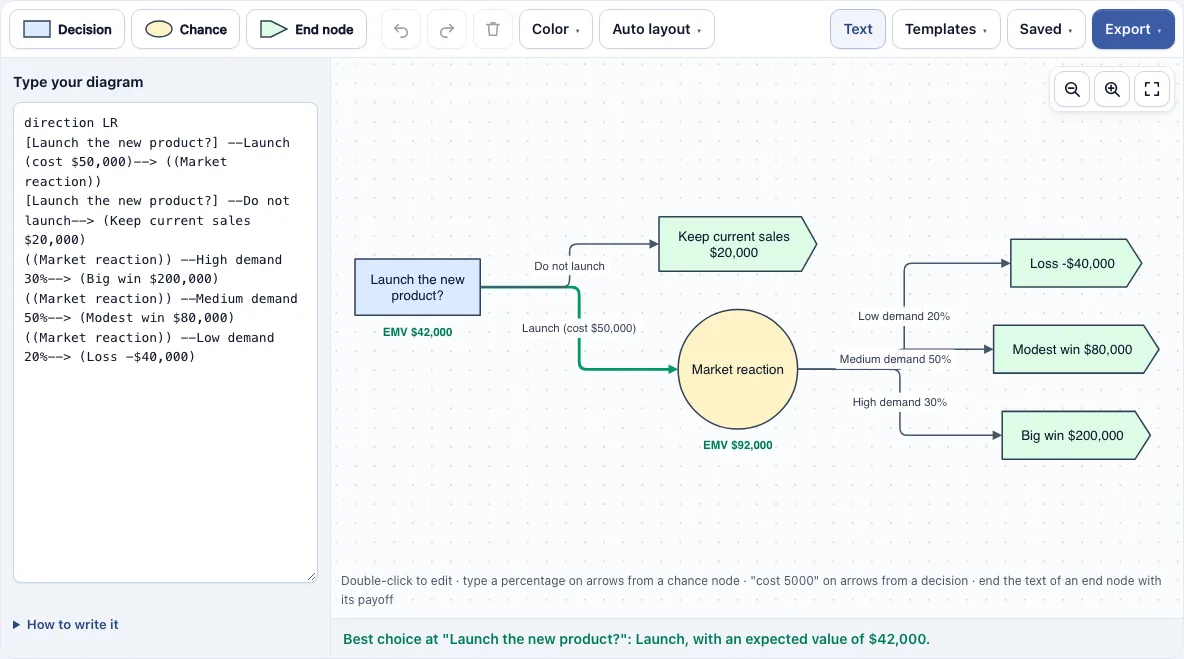
How to use the Decision Tree Maker
- Open the tool. It starts with the Launch a new product? example. To begin with a different tree, open the Templates menu and pick Build or buy the software?, Raise the price? or Take an umbrella?.
- Add nodes with the toolbar buttons, or with the + buttons next to a selected box, and drag a blue dot to connect two boxes. Use Decision (a square) for a choice you make, Chance (a circle) for an uncertain event, and End node (a flag) where a path stops.
- Double-click a box to edit its text. Write each end node’s payoff at the end of its text, for example Big win $200,000.
- Double-click an arrow that leaves a chance node and add its probability, such as High demand 30%. New arrows from a chance node start at 50%.
- Double-click an arrow that leaves a decision and add a cost, such as Launch (cost $50,000).
- Look at the checks under the canvas. Fix any boxes with red outlines until the check names the best choice and its expected value.
- Read the EMV shown under each decision and chance node. The best branch of each decision is drawn as a thick green arrow.
Use Auto layout to tidy the diagram. The Export menu saves PNG, SVG or PDF, with the EMV values and green branches included. Use Save a copy in this browser to keep a version, or Copy link to this diagram to share it.
How do you calculate the expected value (EMV) of a decision tree?
You work backwards from the end nodes to the start, a method called rolling back. Each chance node’s EMV is the sum of probability times value over its branches, and each decision node’s EMV is the best branch value after subtracting that branch’s cost.
Take the Launch a new product? example. Suppose the market reaction has three outcomes: high demand (30% chance, worth $200,000), medium demand (50%, $80,000) and low demand (20%, -$40,000). The chance node’s EMV is 0.3 × $200,000 + 0.5 × $80,000 + 0.2 × (-$40,000) = $92,000. Launching has a $50,000 cost, so its value is $92,000 − $50,000 = $42,000. Not launching is worth $20,000. Launching has the higher value, so it is the best choice.
Two rules keep the calculation valid. The probabilities leaving each chance node must add up to 100%. The result is an average weighted by probability, so it describes what happens over many similar decisions, not what will happen in one case.
What do the square, circle and end node mean in a decision tree?
A square is a decision node: a choice that you make. A circle is a chance node: an uncertain event that nature or the market decides, with probabilities on its arrows. An end node, drawn as a flag, is where a path stops and carries the payoff for that path.
Read the tree from left to right, from the first choice to the final results. Each arrow leaving a square is an option you control, and it can carry a cost. Each arrow leaving a circle is one possible outcome, and its probability says how likely it is. Every path must finish at an end node, and each end node needs its own payoff. If two paths lead to the same result, give each end node different text, because boxes with the same text are treated as one box.
Frequently asked questions
Is the decision tree maker free?
Yes. The tool is free and needs no sign-up. Your work is saved in your browser, and exports have no watermark.
Will my decision tree be uploaded to a server?
No. Your work is saved in your browser, and nothing is uploaded. When you use Copy link to this diagram, the diagram is stored in the part of the link after the # sign, so it is not sent to any server.
Why does a box have a red outline?
A red outline shows a problem with that box or the arrows around it. Common causes are probabilities that do not add up to 100%, a missing probability, an end node without a payoff, or a box with no branches. The check under the canvas lists the problems, and it names the best choice once everything is correct.
How do I enter a negative payoff or a loss?
Write the number at the end of the end node’s text, such as Loss -40,000 or Loss (40,000). The tool understands $, € and £ signs, thousands commas, and k and m suffixes like 12k or 1.5m.
Does expected value take my attitude to risk into account?
No. EMV ignores risk attitude. A choice with the highest EMV is the one with the best average result, but if a bad outcome would be hard for you to accept, a lower-EMV option may suit you better.
Can two arrows point into the same box?
Not in a valid tree. A decision tree branches out and does not merge, so the checks flag any box that has more than one arrow pointing at it. If two paths lead to the same result, draw a separate end node for each path, with different text.
Can I use my decision trees commercially?
Yes. Everything you make here is yours to use for personal, school and commercial work, including reports, slides, books and printables you sell. No credit is required. The only thing you may not do is copy the tool or the site itself to run a competing service; see the terms.
Related tools
- Flowchart maker: use it to draw step-by-step processes, when you need steps rather than choices with probabilities.
- Flowchart templates: use these ready-made starting points for common process diagrams.
- Data flow diagram maker: use it to show how data moves between parts of a system.
- Venn diagrams, concept maps and tree diagrams: use this page to compare other diagram types for ideas and relationships.
- All Diagram Smith tools: use this page to see every tool in one place.