Concept Map Maker
Add concepts, connect them with labelled arrows and download the finished concept map as PNG, SVG or PDF.
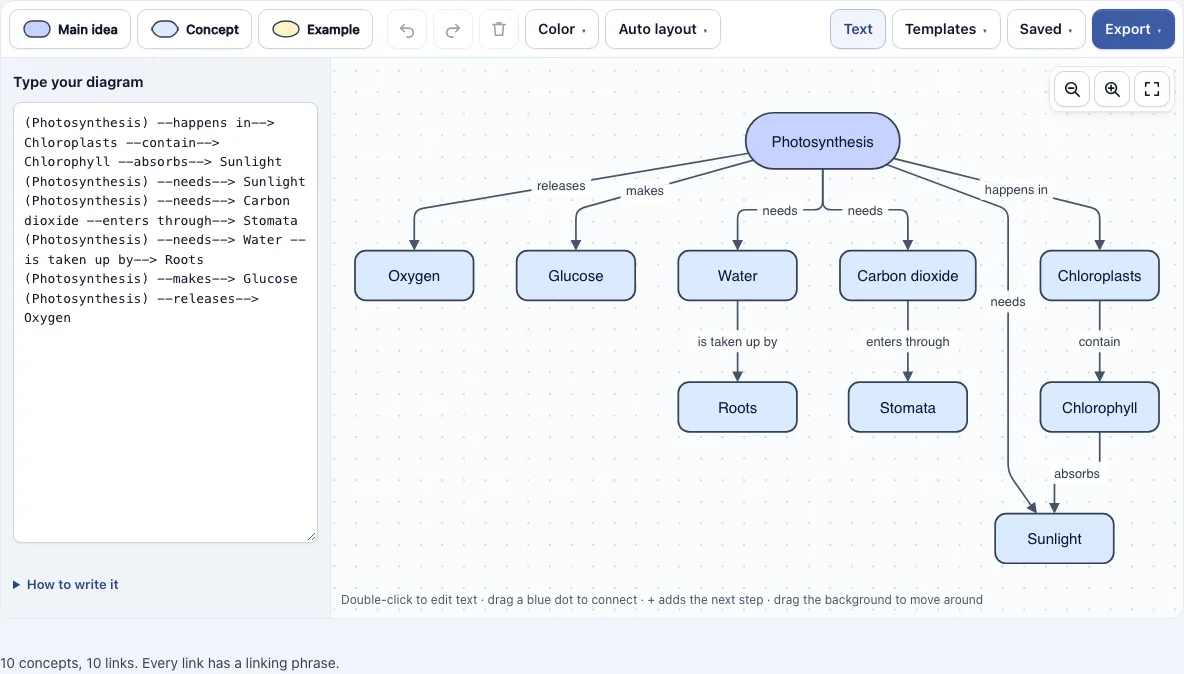
How to use the concept map maker
- Open the editor. The sample photosynthesis map loads, ready to edit.
- To start over, open the Saved menu and choose the option that starts a new empty diagram. To start from an example, open the Templates menu and pick one of the four maps.
- Double-click empty space to add a Concept there, or choose Main idea, Concept or Example in the toolbar to add that shape.
- Double-click a shape to edit its text. Press Enter to save, Shift+Enter for a line break, or Esc to cancel.
- To connect two boxes, drag one of the small blue dots on the edge of a box onto another box. Dropping the dot on empty space creates a new connected box. A selected box also shows four + buttons that add a connected box on that side.
- Double-click each arrow and replace the placeholder phrase “links to” with a linking phrase such as “needs” or “is part of”.
- Check the status line under the map. It counts your concepts and links and warns you about links that still say “links to” or have no phrase.
- Use the Auto layout menu to arrange the map top to bottom or left to right, then drag boxes to fine-tune it.
The Text button lets you type links instead. Open the Export menu to save a PNG (normal, 2x or 4x), an SVG or a PDF. Your work is saved automatically in your browser.
What is a concept map?
A concept map is a diagram of ideas, called concepts, joined by labelled arrows, called linking phrases. Two concepts and the phrase between them form a proposition, such as “Plants need sunlight,” so each link can be read as a complete statement. This is what separates a concept map from a simple chart of boxes: the arrows explain the relationship, not just the connection.
Concept maps are usually drawn with the most general concept at the top and more specific ones below. For example, “Photosynthesis” might sit at the top, with links such as “needs” to “Sunlight” and “Water,” and “makes” to “Glucose” and “releases” to “Oxygen” lower down. A cross-link joins concepts in different branches, which shows a relationship that a strict tree cannot show. Joseph Novak and colleagues at Cornell University developed the technique in the 1970s.
What is the difference between a concept map and a mind map?
A mind map radiates from one central word, and its branches usually have no phrases on them. A concept map is a network instead. Every link carries a linking phrase, and any concept can link to any other, so the map can contain loops and cross-links.
Choose a mind map when you are brainstorming around one word and want to capture associations quickly. Choose a concept map when you need to show how several ideas relate to each other and why. Because each link is labelled, a concept map is easier to check for accuracy, since you can read every arrow aloud and judge whether it makes sense.
How do you make a concept map?
Start with a focus question, such as “How do plants make food?”, and list the 10 to 20 concepts that answer it. Put the most general concept at the top and the more specific ones below it. Link pairs of concepts and write a short verb phrase on each arrow, then look for cross-links between branches. Read every proposition aloud and reword any arrow that does not make a true sentence.
Frequently asked questions
Can I make a concept map from text?
Yes. Click the Text button and write one link per line, such as Plants –need–> Sunlight. The map redraws as you type, and changes you make in the drawing update the text. Lines that start with // are treated as notes.
What is a linking phrase?
A linking phrase is the short label on an arrow that says how two concepts relate, such as “needs” or “is part of.” New links start with the placeholder “links to,” which you should replace with a real phrase.
Can I export a concept map as PNG, SVG or PDF?
Yes. The Export menu offers PNG image, PNG at 2x, PNG at 4x (print quality), SVG (vector) and PDF, plus Copy image to clipboard. Files are cropped to the diagram, have a white background and carry no watermark.
Are there concept map examples I can edit?
Yes. The Templates menu loads four editable maps: Photosynthesis, The water cycle, Parts of an essay and Healthy eating. You can use them as examples or replace the words with your own to create a concept map template.
Is my concept map saved or uploaded?
The diagram is not uploaded. Your latest work is saved automatically in your browser. The Saved menu keeps named copies and can copy a link that holds the whole diagram inside the link itself, not on a server.
Why does the status line warn me about my links?
The status line counts your concepts and links, then warns you how many links still say “links to” or have no linking phrase. Keep editing until every link has a phrase, and the warning will stop.
Can I use my concept maps commercially?
Yes. Concept maps you make here are yours to use for personal, school and commercial work, including reports, slides, books and printables you sell. No credit is required. The only thing you may not do is copy the tool or the site itself to run a competing service; see the terms.
Related tools
- Venn diagram maker: use it to compare two or three groups and show what they share.
- Tree diagram maker: use it when your ideas branch in a strict hierarchy with no cross-links.
- Venn diagrams, concept maps and tree diagrams: see all the tools in this group in one place.
- Flowchart maker: use it when you need to show steps or decisions in order.
- All Diagram Smith tools: browse every free diagram tool on the site.