Circular Flow Diagram Maker
Enter the flows of an economy to see the circular flow diagram and a leakages versus injections check, or draw any process as a cycle.
Free · runs in your browser · nothing is uploaded
How to use the Circular Flow Diagram Maker
- Open the Diagram type menu. Choose Economy to draw households, firms and markets, or Custom cycle to draw a repeating process.
- For an economy diagram, open the Model menu and pick a level: households and firms with saving and investment, adding the government, or adding the rest of the world.
- Type an amount into each flow field: consumption C, saving S, net taxes T, investment I, government spending G, exports X and imports M. Add an optional unit such as $ billion.
- Read the table under the drawing. It lists the leakages and injections with their totals and says whether the flow is in balance.
- For a custom cycle, type between 2 and 12 steps. Choose clockwise or counter-clockwise, and turn numbered steps and a different color for each step on or off.
- Move any step up or down with its arrow buttons to change its place in the ring.
- Open the Export menu to save a PNG, PNG 2x, PNG 4x, SVG or PDF, or choose Copy image to clipboard.
The Examples menu loads ready-made models, and Download CSV saves the economy flows or the cycle steps. Use the Saved menu to keep named copies or copy a link that holds the whole diagram.
What is a circular flow diagram?
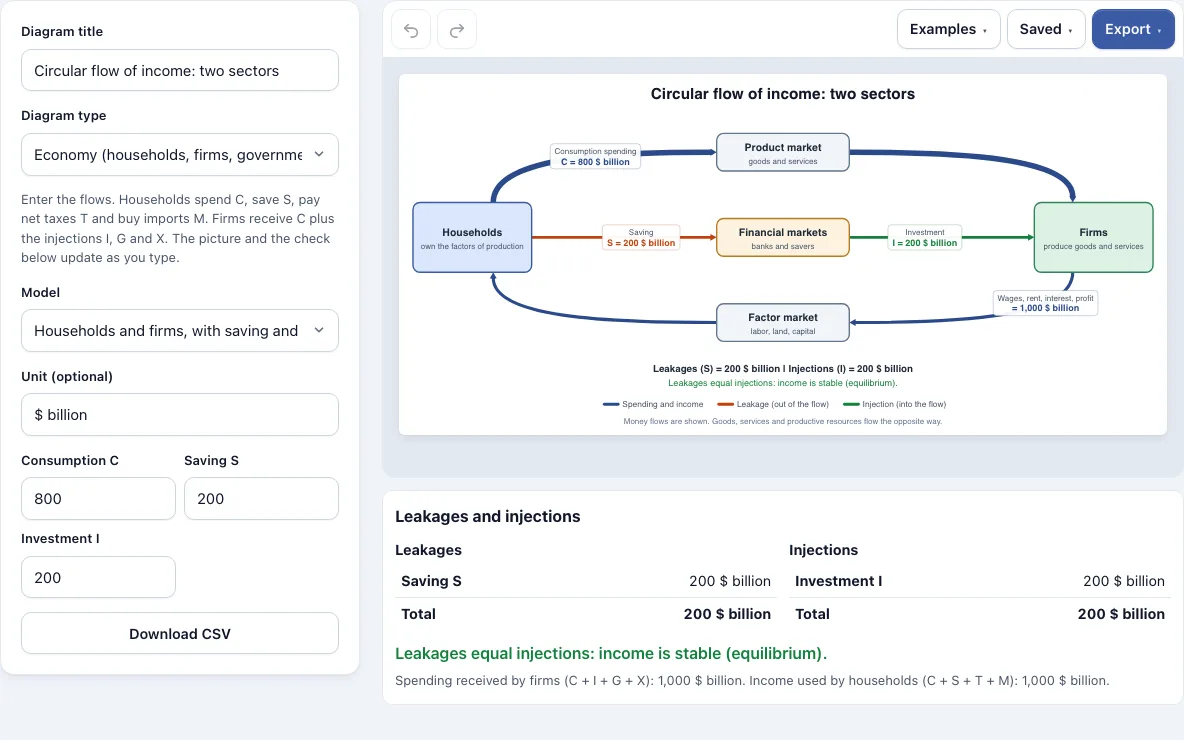
A circular flow diagram is a model of an economy drawn as a loop. Households and firms sit on opposite sides, and money travels one way around the loop while goods, services and productive resources travel the other way. Each arrow shows one flow and its size.
Households spend consumption C through the product market to firms. In the factor market, firms pay wages, rent, interest and profit back to households. Because the money keeps circulating, the loop shows how income and spending depend on each other.
What are leakages and injections in the circular flow of income?
In this model, leakages are the money households take out of the spending stream (saving, net taxes and imports), and injections are the money put back into it (investment, government spending and exports). The tool defines leakages as S + T + M and injections as I + G + X. When the two totals are equal, income is stable, which economists call equilibrium.
| Model | Leakages | Injections | Result |
|---|---|---|---|
| Two sectors (C 800, S 200, I 200) | 200 | 200 | Balanced; firms receive 1,000 |
| Three sectors (C 700, S 150, T 150, I 150, G 150) | 300 | 300 | Balanced |
| Four sectors (C 600, S 150, T 150, M 100, I 150, G 150, X 100) | 400 | 400 | Balanced; 1,000 both ways |
| Not in balance (C 600, S 100, T 120, M 80, I 180, G 150, X 120) | 300 | 450 | Injections exceed leakages by 150, so income tends to rise |
In the last model, firms receive 1,050 while households have 900 to use. Spending is higher than income, so national income tends to rise. If leakages were larger, income would tend to fall. All amounts are in $ billion.
How do changes in leakages move national income?
Change one amount and watch the verdict. Start from the Four sectors example, where leakages and injections are both 400. Raise saving S from 150 to 250 and leakages become 500 against injections of 400. Leakages now exceed injections by 100, so households spend less than they earn and income tends to fall. Raise investment I by the same 100 and the two totals match again.
Frequently asked questions
What does a circular flow diagram show?
It shows how money moves between households, firms and, in larger models, government and the rest of the world. Each arrow carries a flow such as spending, wages, saving or taxes. Its thickness reflects the amount, so you can see where money is largest.
How do I explain a circular flow diagram?
Start with households on one side and firms on the other, then follow the spending arrow from households to firms. Next, follow the payment arrow back through the factor market. Finish by comparing leakages with injections to explain whether income is rising, falling or stable.
What is the difference between the two-sector, three-sector and four-sector model?
The two-sector model has households and firms only. The three-sector model adds government, with net taxes T and spending G. The four-sector model adds the rest of the world, with imports M and exports X. Each added sector creates more flows to count.
What are the two types of flow in a circular flow diagram?
The two types are money flow and real flow. Money flow moves in one direction, such as spending and payments. Real flow moves the other way, carrying goods, services and productive resources such as labour and capital.
How do I make a circular diagram for the water cycle or PDCA?
Select Custom cycle in the Diagram type menu, then type each stage as a separate step, from 2 to 12 steps. You can load the Water cycle or PDCA cycle from the Examples menu and edit it. Set the direction, numbering and colors, then export it.
Can I use my circular flow diagram commercially?
Yes. Everything you make here is yours to use for personal, school and commercial work, including reports, slides, books and printables you sell. No credit is required. The only thing you may not do is copy the tool or the site itself to run a competing service; see the terms.
Related tools
- Flowchart maker: use it when you need decision branches and step-by-step process logic rather than a loop.
- Flowchart templates: use these as a starting point when you want a ready-made layout for a common process.
- Pie chart maker: use it to show how a whole is split into shares, such as the parts of household spending.
- Timeline maker: use it to place events or stages along a line of dates.
- Sankey diagram generator: use it to show how an amount splits into flows between categories, with the width of each flow set by its size.
- Flowcharts and process diagrams: browse every tool in this group to find the right diagram type.